Postgres branching without moving your database
Stream production Postgres into a continuously updated mirror with pgstream, then give every pull request and agent its own copy-on-write branch. No migration.
By:
Claudiu DascalescuPublished:
Reading time:
7 min readYou have a production Postgres on RDS. Migrating it is a quarter's worth of work that nobody wants to own, and if it goes wrong, the outage is yours.
Then you learn about copy-on-write branching: copies of production data fast enough to hand one to every pull request and every coding agent, priced so that having a thousand of them is a normal thing to do. Your agents need real data to be useful, and you'd rather they never touched the real database.
So instead of migrating, you can stream the data to a continuously updated copy of production so you can branch. Call it the mirror.
It's a second Postgres that starts as a full copy of your production data and then follows it, applying every insert, update, delete, and schema change from the source.
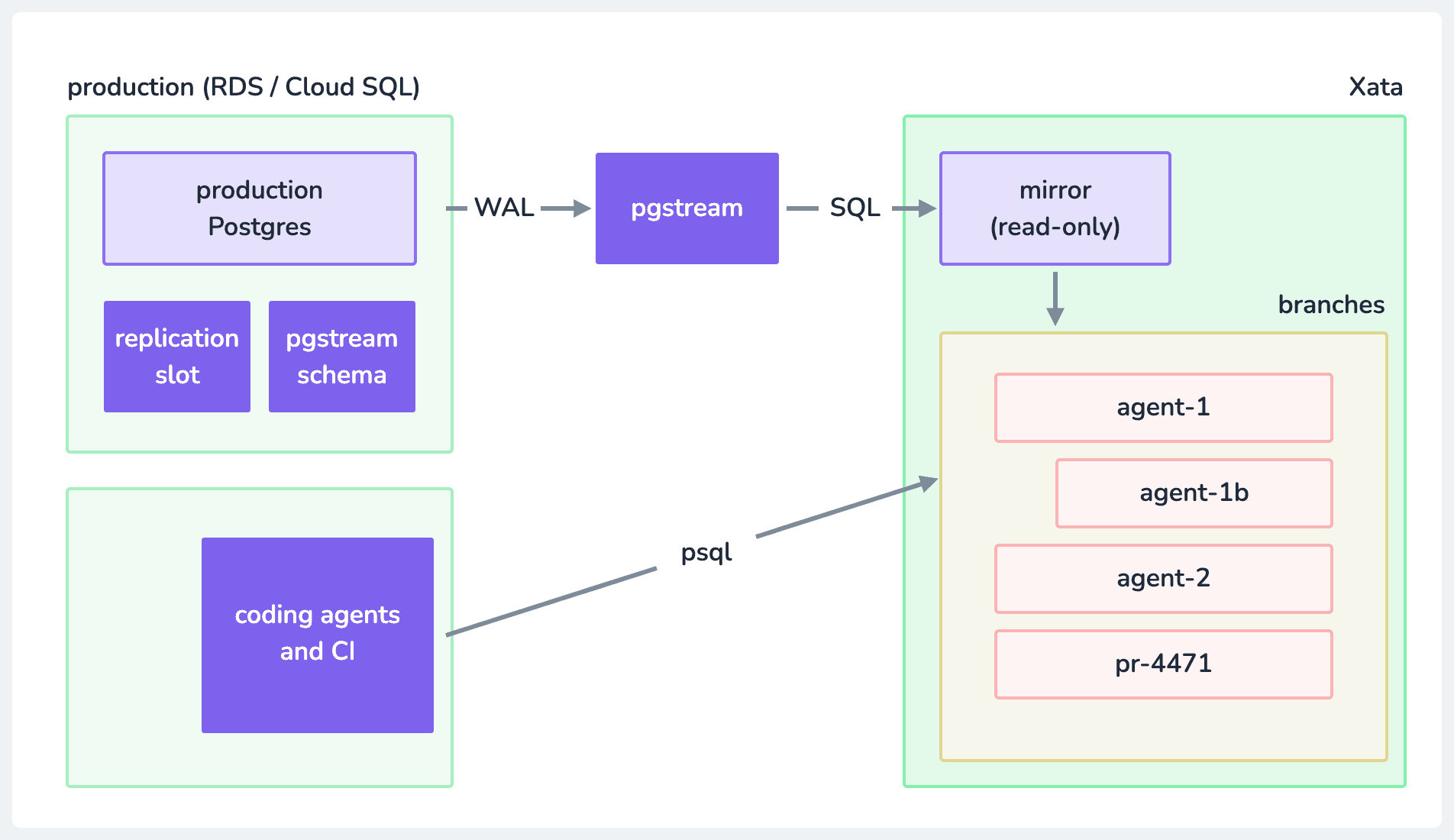
Production stays where it is. It gains a replication slot and a small pgstream schema, and everything downstream of the mirror is disposable.
Step 1: the mirror
Change data capture reads the write-ahead log and replays it somewhere else.
We maintain pgstream for this, so that's what the commands below use. It's Apache 2.0, and it runs as one process you point at two databases.
If you already have the Xata CLI, it ships its own pgstream and may come first on your PATH. Check pgstream --version before you file a bug against the wrong binary.
The source needs logical decoding through the wal2json plugin. Managed services like RDS include it. On self-hosted Postgres, install it first (apt install postgresql-17-wal2json on Debian, for Postgres 17), or --init stops with could not access file "wal2json".
The target is the database you'll branch later, so create it on Xata first and grab its URL:
--no-parent matters: without it, branch create copies whatever branch you have checked out, and the mirror should start empty. --postgres-version takes an image name such as postgres:17.11, and the CLI prompts for instance size and replicas if you leave them out. The region and version flags are there because the Postgres major version should match your source, and the mirror should sit in the region your production database is already in. Cross-region works, but your cloud provider bills every WAL byte that leaves the region on the source side, and cross-AZ transfer is billed too, just less. That's your AWS bill, not your Xata bill, which makes it easy to miss.
Then two URLs and one command:
--init sets up the source side: it creates a logical replication slot and a small pgstream schema with the event triggers that catch DDL. --snapshot-tables says take a full copy first, then start streaming. Without it you'd get changes from now on and no history.
The snapshot phase works like a parallelized pg_dump. How long it takes depends less on pgstream than on where you run it: rows travel through the machine running pgstream in batches, so every batch is a round trip to both databases. Run it near them. From a laptop on the other side of an ocean, even a modest table takes tens of minutes. When the snapshot finishes, pgstream switches to streaming and applies WAL as it arrives.
Once it's streaming, check it. Run in two separate terminals (try this on staging first):
The row is there a few seconds later. Don't wait for pgstream to log it: at the default level it says nothing about individual writes. What it does log is the hand-off from snapshot to streaming, which is the line to look for:
Kill pgstream, write more rows to production, and start it again, this time without --snapshot-tables and --init. Leave them in and it starts over with a full snapshot. Without them it resumes from the last confirmed LSN and catches up, because the replication slot held the WAL while it was away. That property is why the mirror survives restarts, and also why you need to watch it. More on that below.
DDL comes along for the ride, which is the part that separates this from most CDC setups. ALTER TABLE ... ADD COLUMN on production shows up on the mirror, because the event triggers --init installed turn schema changes into events in the stream.
What you have now is a Postgres that is not your production database and stays close behind it. Not perfectly real time: how far behind depends on your write volume, so measure it on yours.
Step 2: branch the mirror
The mirror is a Xata branch, so everything below it is one command per agent, per PR, per whatever:
That's a full, writable Postgres with your production data in it. Not a replica, not a subset, not seed data that looks vaguely like the real thing until the one query with the pathological join plan shows up. DROP TABLE in it if you like. It costs the storage of the pages you change plus compute while it runs, and it took about three seconds because it was pointers.
Data lives in blocks, and a metadata index records where each block is. Creating a branch copies the index and not the blocks, so parent and child read the same pages until one of them writes, and only then does that single page get duplicated. A hundred branches off the same mirror take about the same storage as one until they start diverging. It also explains why you need the mirror at all: shared pages need shared storage, and RDS does not hand you its block layer. The longer version has diagrams.
Hand it to a coding agent and let the agent be as reckless as agents are. Run a hundred of them in an agent sandbox setup. The blast radius of the worst thing any of them can do is one branch that you delete afterward.
Here's all of the above in 16 minutes:
The branch does not follow the mirror, and that's the whole trick
The mirror follows production. A branch is frozen at the moment you create it.
Point three copies of the same app at production, the mirror and a branch. Rows added on production show up in the mirror a moment later; the branch doesn't move. Wreck the branch and nothing else notices. Delete it, branch again, and you're on current data. Branch a branch and the child inherits the parent's state, mess included.
Need the same dataset across a hundred parallel runs? The fixed branch point gives each one an identical start. Allocate branches, use them, throw them away.
What a branch costs
With scale-to-zero on, an idle branch bills no compute, and copy-on-write stores only its diffs from the parent. A short-lived CI branch costs very little compute (the arithmetic), so give one to every pull request, CI job and agent run. The exception: a branch kept awake serving real traffic is a production database and gets billed like one.
Doing it against RDS specifically
Five things can each cost you an afternoon: four from AWS, one from Xata.
Logical replication is off by default. Set rds.logical_replication in a custom parameter group (default groups can't be edited), attach it, and reboot. That reboot is the only step that needs a maintenance window.
Point at the writer, not a reader or the Aurora cluster-ro endpoint. The parallel snapshot is tied to one instance, so workers on another reader fail at random with snapshot "..." does not exist. pgstream check catches this up front.
There is no superuser. Init needs a role that can create event triggers; streaming can run as a user with rds_replication. If you can't grant the init role, pgstream init --slot-only --replication-slot <slot> creates just the slot, without the event triggers. Then start pgstream run --replication-slot <slot> without --init. Data streams, schema changes don't, and keeping schemas aligned is on you.
Trigger management on the target. On Xata only the xata user can set session_replication_role. Any other role fails with permission denied to set parameter "session_replication_role" unless you turn trigger management off in your pgstream config file (pgstream run -c pgstream.yaml):
Roles with passwords won't snapshot, because pg_authid is off limits on RDS. In the same file, turn role snapshotting off and manage roles yourself:
Full walkthrough: the AWS RDS migration docs and the streaming replication tutorial.
What to watch
The replication slot. Postgres keeps WAL for an inactive slot until it catches up or is dropped, so if pgstream stays stopped, retained WAL grows on the production disk. Monitor it:
An inactive slot with a growing retained needs attention. When you retire the mirror, run pgstream destroy --postgres-url "$PROD_URL" to drop the slot and schema.
A second copy of your production data, PII included, reachable by every agent with a branch. Anonymize on the way in with per-column transformers in the same pgstream config file:
Do it when you create the mirror; adding it later means rebuilding it.
What you end up with
Production never moves, a mirror follows it, and every pull request, CI job and agent gets its own writable copy. The cost is one more system to run, a slot to watch and some lag. In exchange, your agents never write to production.
Try it: stream one table from a staging RDS instance into a Xata branch with pgstream, then branch it and give it to an agent.
Give every agentic workload its own Postgres branch
Create instant database clones with production-like data for every agent, workflow, and CI/CD pipeline.
Related Posts
Branching brings predictability to web development
Explore the advantages of branching in developer workflows and how Xata brings these benefits to data infrastructure.
Closing the loop: Building a coding agent that uses Postgres branches
Explore how to build an AI coding agent that follows a full developer workflow, including creating Postgres branches, using a sandbox, fixing bugs, and raising pull requests with Xata, Vercel, and GitHub.
Neon vs Supabase vs Xata: Postgres Branching Compared
Compare how Neon, Supabase, and Xata handle Postgres branching. Covers copy-on-write vs schema-only approaches, with architecture diagrams.
What if database branching was easy?
We usually think branching means copying the whole database. With copy-on-write, it doesn't. Let's compare workflows like seeding to DB branching.