A thousand Postgres branches for $1
See how we reduced branching times from 20+ seconds to around a second and what use-cases these speed improvements enable.
By:
Tudor GolubencoPublished:
Reading time:
6 min readIn the latest Xata release, we’ve drastically improved how fast databases are provisioned, branched, and un-hibernated (wake up from scale-to-zero). Branching times, for example, went from 20+ seconds down to 1-2 seconds.
For many use-cases, it is now a no-brainer to create branches on-the-fly with scale-to-zero enabled. Think of use-cases like:
- A Postgres for each PR / preview env.
- Agents creating a DB branch on each iteration.
- Create a branch of the data-warehouse for each interactive SQL session.
These speed improvements make Postgres branches (schema and data) feel really lightweight, regardless of how much data the parent database has. Not only do they “feel” lightweight, but often they are almost free as well.
Demo
Check out the following demo video to see what the new experience feels like.
Note for existing customers: this is available for new projects at the moment, but we’ll migrate all projects soon. Please reach out if you want your project migrated earlier.
The math
Our smallest instance size (xata.micro - 1GB RAM) costs $0.012 / hour, or $9 / month if you run it 24/7.
However, we bill per minute and inactive branches (scaled-to-zero) don’t incur compute costs. If a branch is awake only 5 minutes for a quick test, that costs $0.001. Ten such branches will set you back one penny. A thousand branches, $1.
Because the instance wakes up almost instantly, for non-production use cases it makes a lot of sense to enable scale-to-zero.
On top of compute you pay for storage. However, thanks to copy-on-write storage, branches only include storage costs for the differences to their parents. For example, if the parent branch is 1 TB, the child branch has all the data, so it appears to also be 1 TB. However, you only get billed for the diff to the parent, which is often negligible.
Real-world use cases
You might be wondering what this is good for. Why would anyone create that many Postgres branches? Turns out having very fast and practically free branches enables new automations, especially in the agentic era.
To give a couple of real-world examples:
Enginy, an AI powered sales tool, creates an isolated Postgres branch on every CI build. These branches scale-to-zero automatically after a few minutes and wake-up when needed. This means every preview gets production-shaped data without touching a shared database.
Runner, an AI E-Commerce builder, runs autonomous coding agents that split their work into tasks, and then each agent picks up a task from the tracker, works on it, and opens a PR. That means thousands of PostgreSQL branches created per week, all isolated but at the same time containing realistic production data.
Their total monthly Xata bill? Under $30.
We’ve calculated what it would cost without scale-to-zero enabled and it would be over $600/month. So Xata’s scale-to-zero makes it at least 20x cheaper.
How it works
In order to get almost-instant branching and wake-up times, we combined improvements to both our storage and compute layers.
Storage layer
We’ve talked about Xatastor in detail before. In short, it is a storage engine that exposes ZFS volumes over the network via the NVMe-oF protocol. This allows us to separate compute from storage without having to do any PostgreSQL source code modifications (we run 100% vanilla Postgres).
Separating compute and storage is important for the branching use-case. Without it, all child-branches would have to live on the same node with the parent (so that CoW can work), putting a hard limit on scalability. It could work for a few branches, but not hundreds or thousands like our customers need.
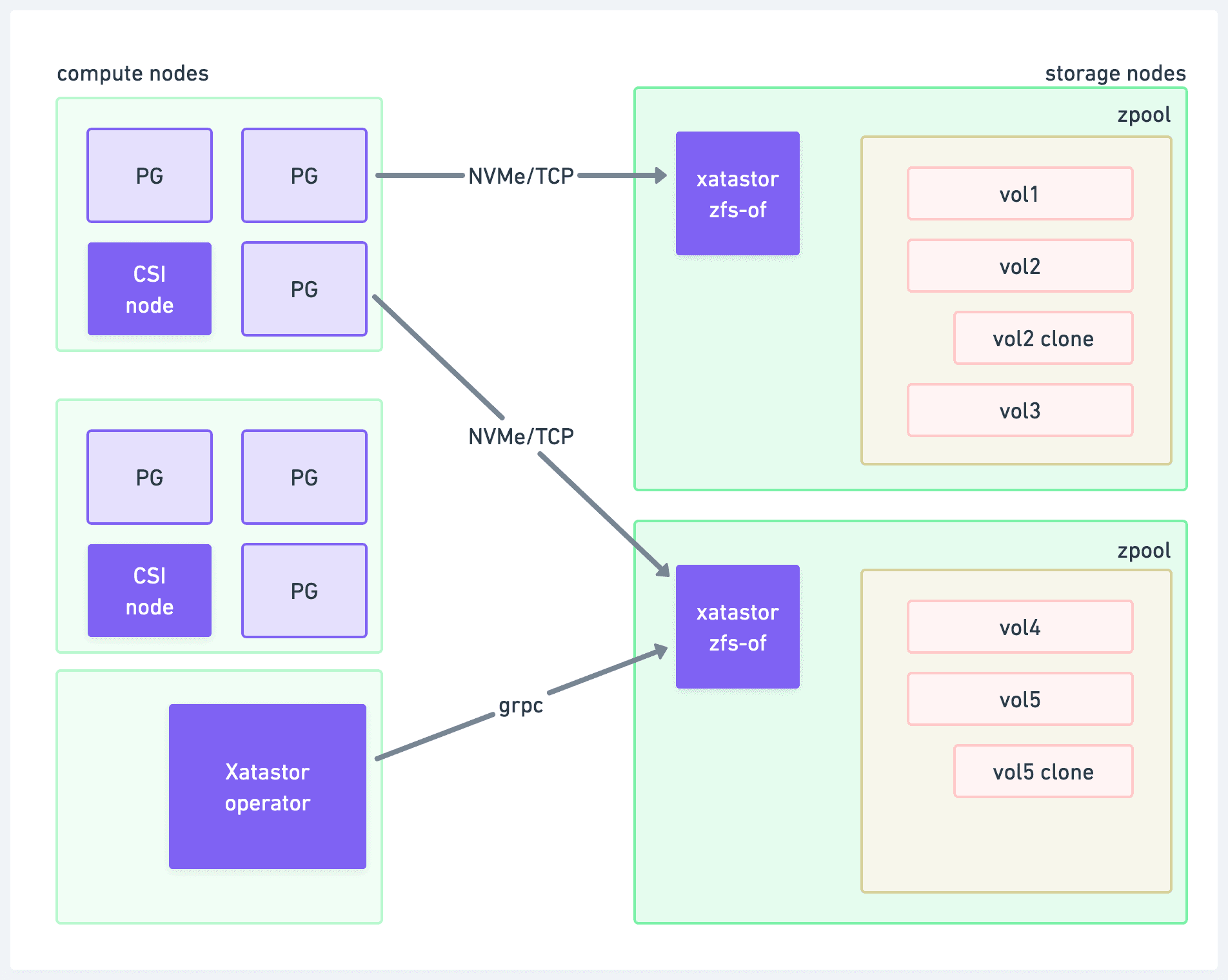
Xatastor - exposing ZFS zvols over NVMe-oF
A key design principle of Xatastor is that inactive volumes (without an active network connection) don’t consume any resource except disk space. This works great for having many scaled-to-zero Postgres branches.
The main reasons we developed Xatastor are scalability to a very large number of volumes and very good reliability. However, having precise control over how compute instances are connected to the volumes turns out to be a key advantage in implementing warm pools for compute. This is what the next section is about.
Warm pools
A few months ago, when we started the project of improving our branch and wake-up times, we measured how long it takes to provision a cluster. The chart looked like this:
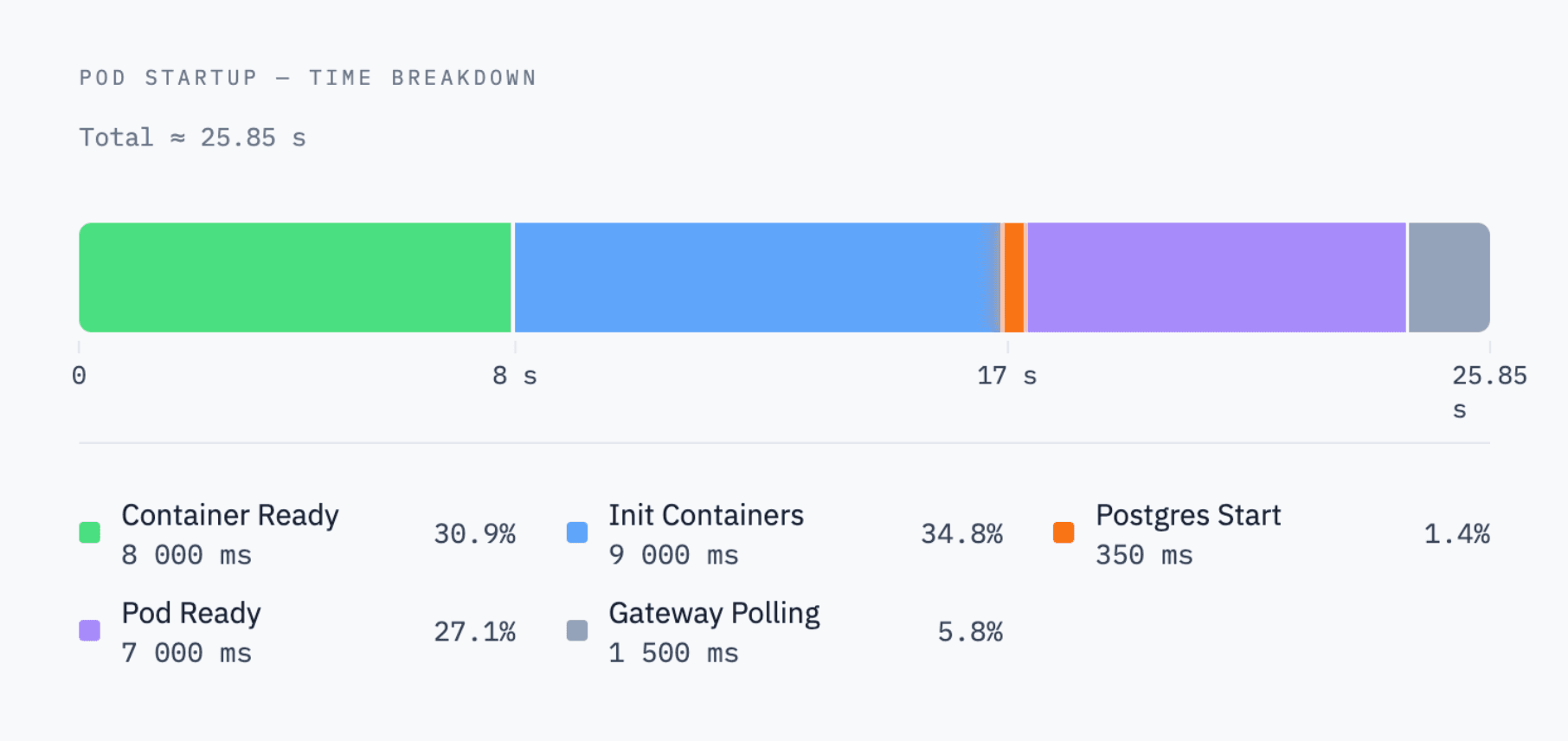
As you see, PostgreSQL itself starts in only 350ms, and the rest of the ~25 seconds was Kubernetes pod provisioning and control-plane overhead.
A lot could be optimized relatively easily: startup/readiness probes, reducing init containers, gateway polling interval. Other things, like the volume attachment time, were trickier, and having our own Xatastor CSI driver was an advantage there, because we could make sure we avoid any long polling intervals.
These efforts allowed us to take the provisioning down to the 3-5 seconds range. However, our target was sub-second, and it became clear that without an architectural change we couldn’t reach that.
So we decided to add warm pools of Postgres clusters. We have two kinds:
- Create pools - used for provisioning new Postgres clusters (empty).
- Wake-up pools - used for the wake-up (scale back up from scale-to-zero) and branching operations.
The difference is that in the create pools we have ready-to-go clusters, running fully initialized PostgreSQL. In the wake-up pools, we have the Postgres process ready to start, but not actually running yet, just waiting for a volume to be attache
Here is how the main operations work.
Create flow
Provisioning new empty PostgreSQL clusters is actually the simplest operation. We pick one ready-to-go cluster from the create pool, assign it to the project in the control plane, and that’s more-or-less the whole operation.
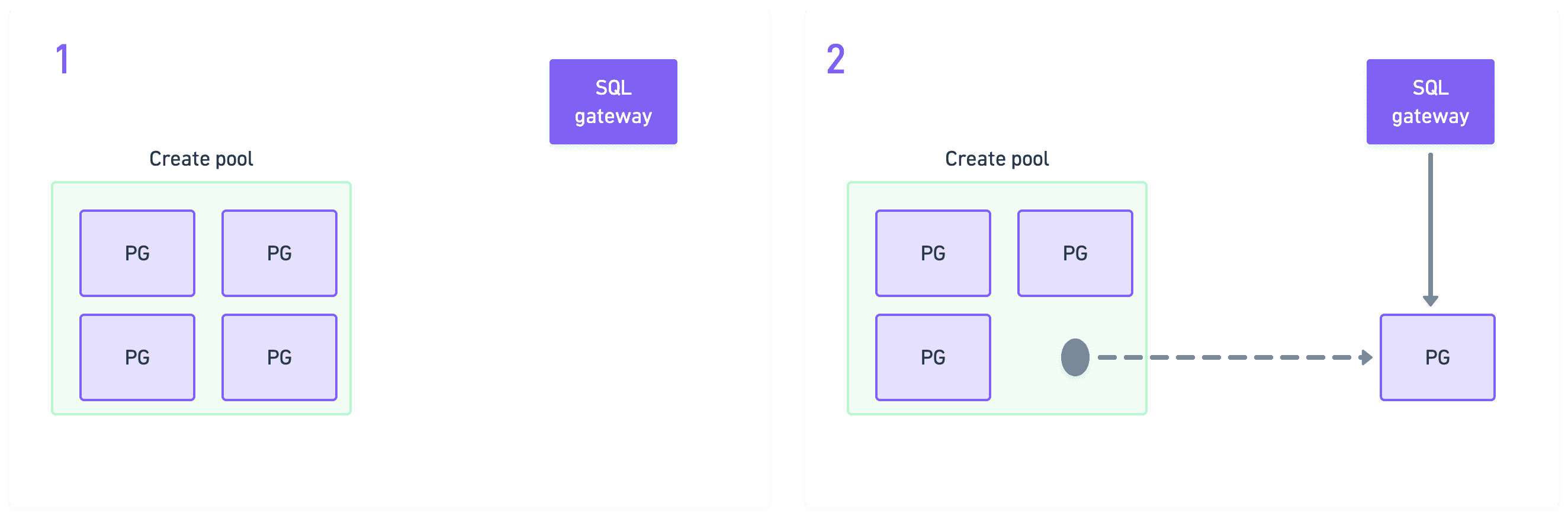
Wake-up flow
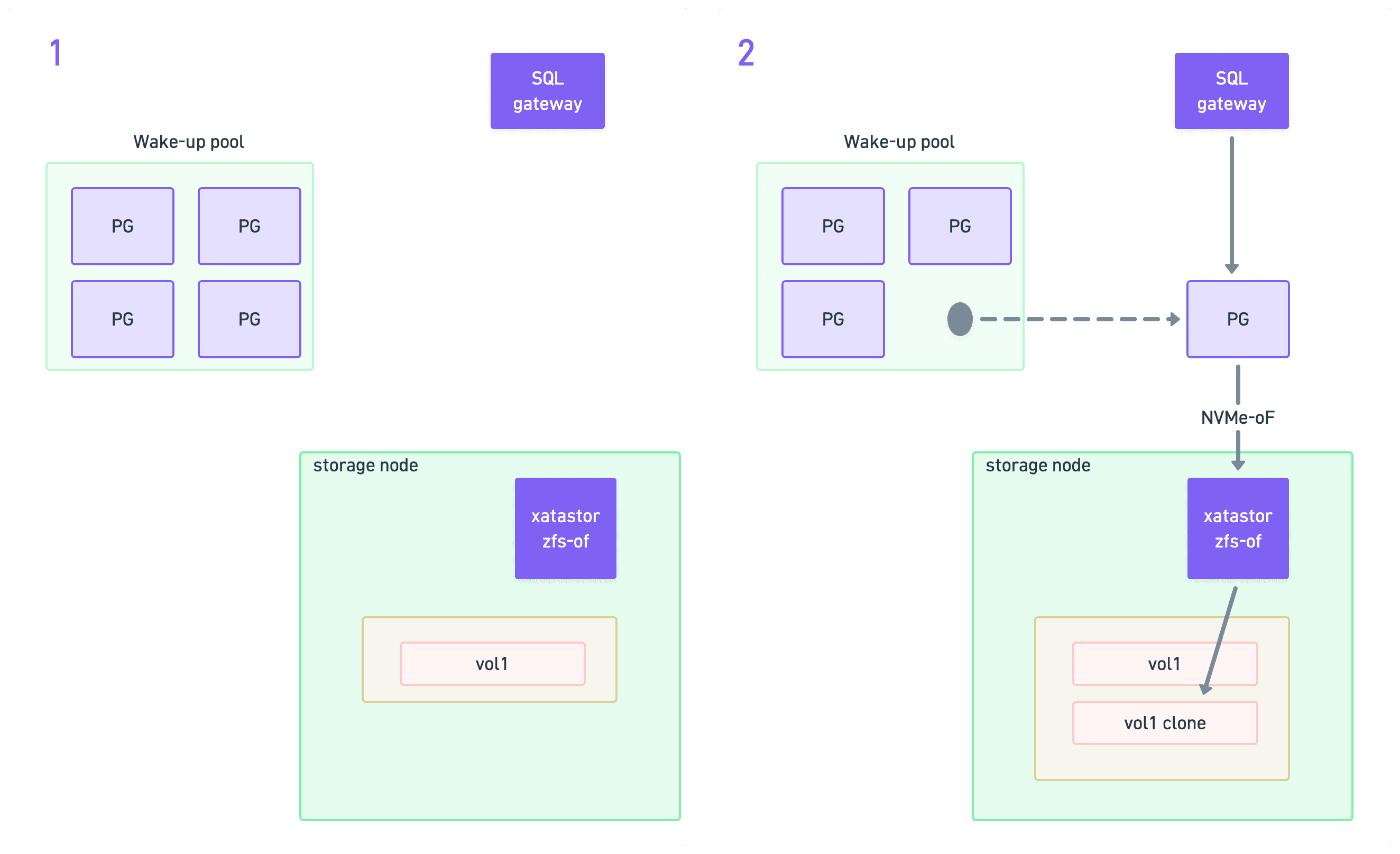
Waking up is more difficult, because we need to hot-connect the volume to the warm cluster. We use the wake-up pools for this. While in the wake-up pool, the pod is fully provisioned, but the Postgres process inside the container is not running yet. We cannot let it start, because it has no volume attached, so Postgres would just error out.
So the first step after picking up a cluster from the wake-up pool is to mount the correct volume to it. We do this by establishing an NVMe-oF connection to the storage node where the volume lives.
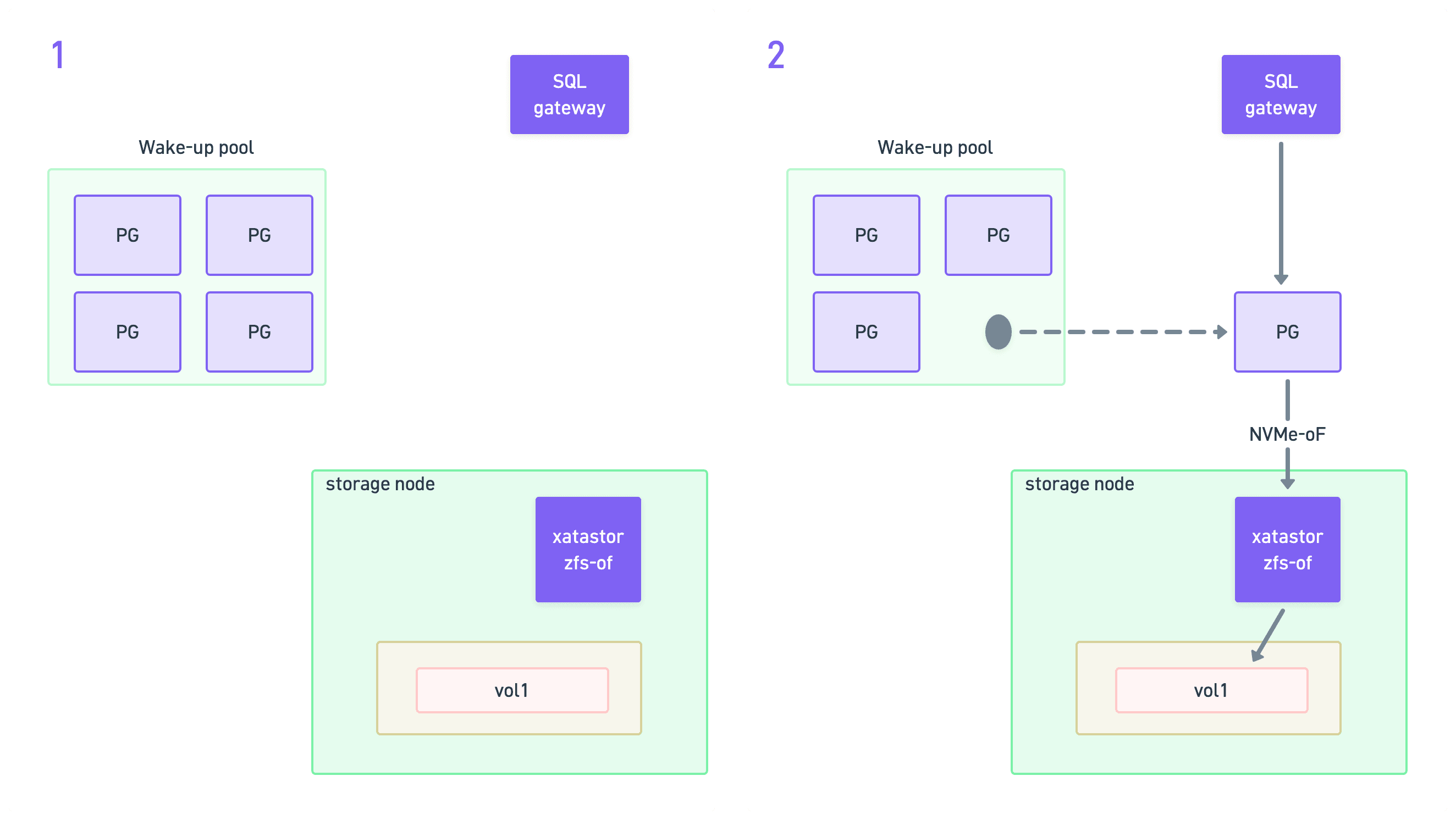
Establishing the NVMe-oF connection is done by our CSI driver on the compute node. For this operation, we bypass Kubernetes APIs, and establish the connection directly at the operating system level.
Once the volume is mounted, we release Postgres to start. Postgres is blissfully unaware of all that happened while it was hibernated. From its point of view, it all looks like a simple restart. It might be days later, in a brand new pod on a completely different node, with the volume mounted just milliseconds before.
But as long as the contents of the volume are exactly the same as on shutdown, Postgres happily starts.
Branching flow
Branching is the most complex operation, but it nicely leverages the primitives above. First, we need to do the copy-on-write clone of the underlying volume. This is a native Xatastor operation that we trigger from the control-plane.
Once we have the child volume, we basically execute the same wake-up flow that we discussed above: we pick up a cluster from the wake-up pool, connect it to the child volume, and release PostgreSQL.
Getting started
You can try all this today by simply signing up and starting a new project on Xata. If you have any questions or interesting use-cases, please don’t hesitate to reach out.
Also, we are hiring. We have tons of fun challenges similar to the ones in this blog post. If you find them fun as well, we’d love to chat.
Give every agentic workload its own Postgres branch
Create instant database clones with production-like data for every agent, workflow, and CI/CD pipeline.