

Base and child branches
Every branch in a project is either a base branch or a child branch:
When you create your first branch in a project, the console suggests the name
main. This is a naming convention only — main is not a special or default branch, and any branch can be the parent of a child branch. Branches can be nested: a child branch can itself have children, forming a branch tree.
Each branch runs on its own compute instance, billed by instance type for the time it runs. Scale-to-zero pauses compute on idle branches, which makes development branches cheap to keep around. See Costs and limits.
Create a branch
Create a child branch
Creating a child branch copies the parent’s schema and data using a Copy-on-Write storage snapshot, so it completes in seconds even for terabyte-scale databases.- Console
- CLI
- API
1
Navigate to the Branches page in your project
2
Click New branch
3
Select the source (parent) branch
4
Give the branch a name
5
Optionally adjust the scale-to-zero settings
6
Click Create branch
- The branch starts with a single primary instance and no read replicas, regardless of how many replicas the parent has. You can add replicas later in the branch settings.
- The branch is a point-in-time copy. Changes made to the parent after creation do not appear in the child, and vice versa.
- If the parent contains sensitive production data, so does the child. For development environments, consider branching from an anonymized staging replica instead of production.
Create a base branch
A base branch has no parent and starts empty — no schema, no data. Use it for a new production database, a staging environment in a specific region, or as the root of a new branch tree.- Console
- CLI
1
Navigate to the Branches page and click New branch
2
Give the branch a name
3
Select a region
4
Choose the PostgreSQL image, instance type, and number of replicas
5
Optionally adjust the scale-to-zero settings
6
Click Create branch
Connect to a branch
Each branch has its own connection string and credentials. When connecting, you choose an endpoint type that controls how traffic is routed within the branch:
To get a connection string, open the branch’s Connect panel in the console, or use the CLI:
psql, Prisma, Drizzle, and other clients, see the branch reference.
View branches
The Branches page in the console shows all branches in your project, either as a list or as a graph visualizing the parent/child hierarchy, along with each branch’s region and creation time. From the CLI:Manage a branch
Each branch has its own Settings page where you can rename the branch, change the instance type, add or remove read replicas, increase storage, upgrade the PostgreSQL minor version, tune PostgreSQL parameters, and rotate credentials. See the branch reference for details on each setting.Scale development branches to zero
Branches that only see occasional use — dev branches, PR previews, staging — don’t need to run around the clock. With scale-to-zero, a branch automatically hibernates after a configurable inactivity period (15 minutes to 3 hours) and wakes automatically when a new connection arrives. While hibernated, the branch’s data is retained but no compute is billed. Scale-to-zero is configured per branch, and your project defines separate defaults for base branches and child branches, so development branches can default to aggressive hibernation while production stays always-on.Delete a branch
Deleting a branch permanently removes the branch and its data. This cannot be undone.- Console
- CLI
1
Navigate to the Branches page
2
Open the actions menu (”…”) next to the branch
3
Select Delete
4
Type the branch name to confirm the deletion
Branching workflows
Dev branches for pull requests
Connect the Xata GitHub App to create a dedicated dev branch for every pull request, and clean it up when the PR closes.
Branch automation in CI
Use GitHub Actions to create branches, apply migrations, and wire preview environments to a branch connection string.
Anonymized production clones
Clone production into a staging branch with PII anonymized on the fly, then create instant dev branches from it.
Test schema changes safely
Try a migration on a child branch first, then apply the same migration to production with zero downtime using pgroll.
How Copy-on-Write branching works
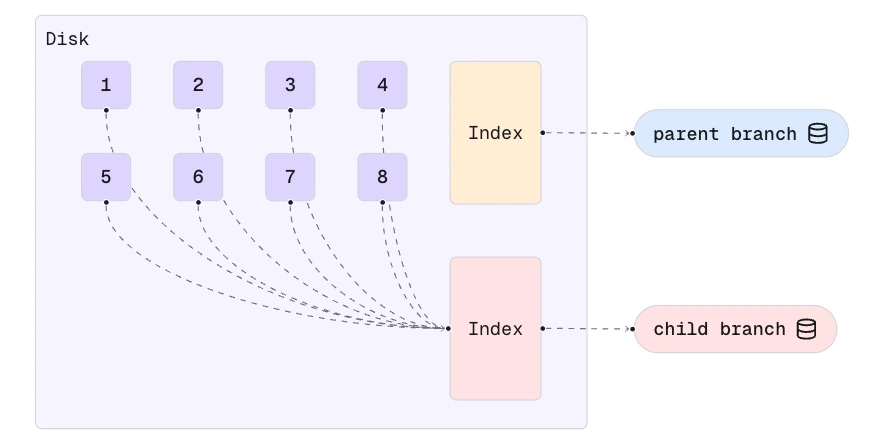
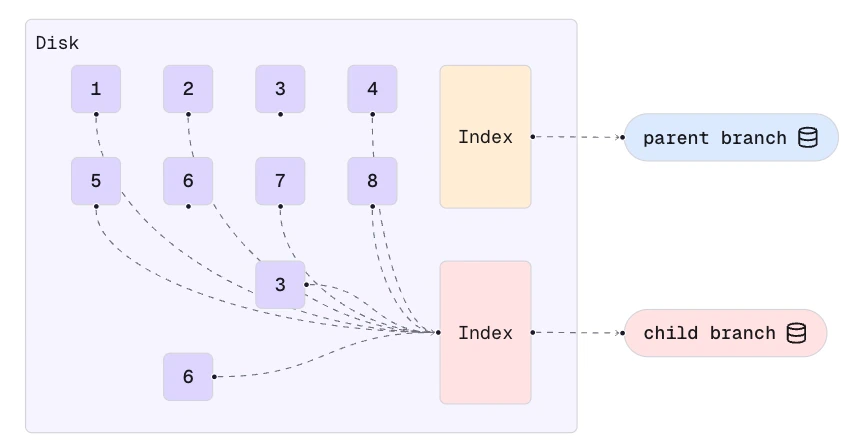
When a branching operation starts, Xata creates a Copy-on-Write snapshot of the underlying logical volume at the storage level, and starts a new PostgreSQL instance on a volume initialized from that snapshot. Because the mechanism lives entirely below PostgreSQL, Xata doesn’t require any modifications to the PostgreSQL source code — branches run vanilla Postgres. In generic terms, Copy-on-Write is a mechanism used to share data efficiently between processes. Instead of copying data right away when multiple programs use it, the same data is shared between programs until one tries to modify it. When stored on disk, the database volume is split into blocks. In the illustration below, the blocks are numbered from 1 to 8. Because we’re using a distributed storage system, the blocks can be on different disks and nodes. A metadata index is used to keep track of where the data blocks are stored.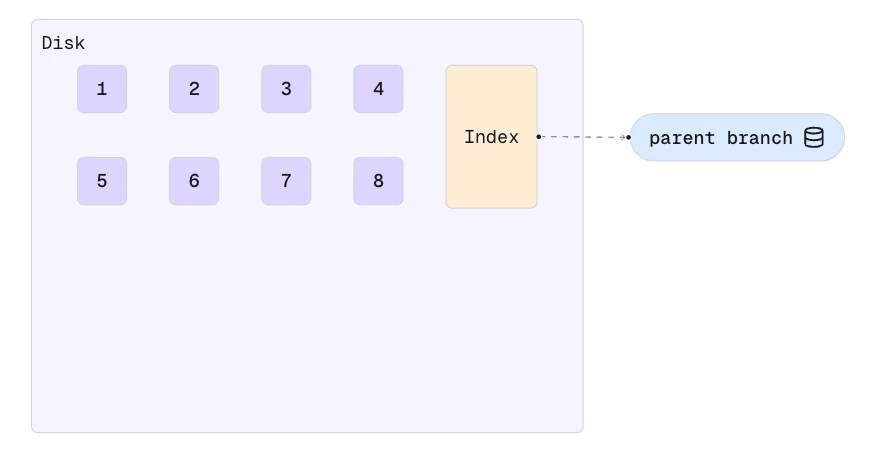
Costs and limits
- Each running branch has its own compute instance, billed hourly by instance type. Scale-to-zero eliminates compute costs while a branch is idle.
- Copy-on-Write shares unchanged storage blocks between a parent and its children, so creating a branch does not duplicate the parent’s storage.
- The number of branches per project and the branch creation rate depend on your plan. If you hit a limit, contact support.
Behavior and limitations
- Do changes in the parent appear in a child branch? No. A child is a point-in-time copy; there is no replication between branches after creation.
- Can I merge branches? No. Schema changes are promoted by applying the same migration to each branch, manually or via CI.
- Can I reset a child branch from its parent? Not in place. Delete the branch and create a fresh one from the parent to get a new point-in-time copy.
- Is
mainspecial? No. It’s the conventional name for the first branch, but Xata has no default-branch or promotion concept — any branch can be a parent. - Can I change a branch’s region? No. Region is fixed at creation, and child branches always live in the parent’s region. Create a new base branch and clone your data to move regions.