Documentation Index

Fetch the complete documentation index at: https://xata.io/docs/llms.txt

Use this file to discover all available pages before exploring further.

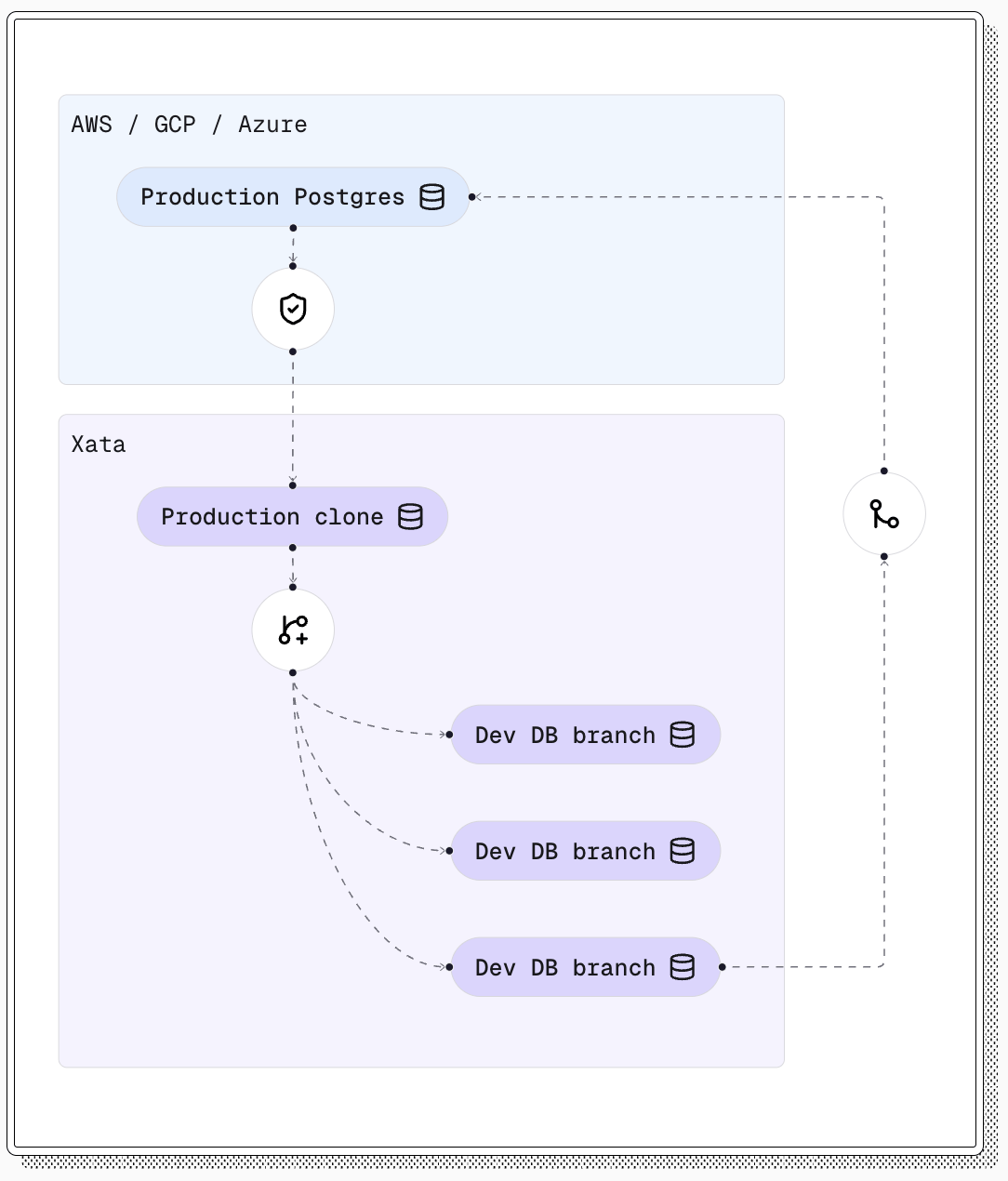
Branch list view showing all available branches in the project Xata’s branching system uses Copy-on-Write (CoW) at the storage layer to create instant database branches. Each branch contains the exact schema and data of the parent branch at the moment of creation, but after creation, branches are independent PostgreSQL instances. Learn more about how branching works.

Overview

The overview page provides a single pane of glass to understand the details of your branch. Branch overview showing branch details and configuration options
  • Connect: Copy a connection string or individual parameters. Choose an endpoint type to route traffic to the primary, read replicas, or a connection pooler
  • Health: View the health and state of your primary instance and replicas
  • Instance Details: Understand the instance health, hierarchy and metadata
  • Create Child: Create a child branch using the current branch as the source
  • Instance Health: Click into an instance node to quickly view the latest metrics
  • Rotate Credentials: Rotate the database password for the xata user for enhanced security
Branch node flyout showing quick actions and branch information

Branch Features

Queries

Execute and manage database queries across your branches.

Metrics

Monitor branch performance and usage across your instances within a branch.

Extensions

Extend your database functionality with extensions.

Schemas

Manage your database structure and schema.

Migrations

Apply schema changes to your database without downtime.

Settings

Configure branch-specific settings including instance details, compute and PostgreSQL parameters.

Instance Details

Configure the fundamental properties and settings for your branch instance. Branch settings showing instance details and configuration options
  • Branch Name: Set and modify the human-readable branch name
  • Replicas: Configure the amount of replicas for a branch
  • Instance Type: Configure the instance type for this branch
  • Storage: Adjust storage size for the branch in GB. Storage can only be increased, not decreased, with a maximum of 1024 Gi (1 TB). You are charged based on actual usage, not the configured limit. Note that 0.5-1% of the configured limit is reserved for filesystem overhead.
  • PostgreSQL Image: Select from available PostgreSQL images including standard postgres, and analytics-optimized. You can upgrade to newer minor versions (e.g., from 17.5 to 17.7) but cannot change the offering type or perform major version upgrades.

Compute

Configure scale-to-zero settings for cost optimization. Learn more about compute settings →

Rotate Password

Generate a new password for the PostgreSQL xata user on this branch. Existing connections keep working, but new connections must use the new password. You can rotate the password from the branch settings page or using the CLI:
xata branch rotate-password <branch-name>
  • Existing database connections remain active during rotation
  • New connections will use the new password once rotation completes
  • PgBouncer automatically picks up the new password for connection pooling
  • There may be a brief period where credentials are unavailable during rotation

PostgreSQL Configuration

Fine-tune PostgreSQL parameters and settings for optimal database performance. Branch settings showing PostgreSQL configuration parameters
  • Connections: Configure connection and authentication settings
  • Resource Consumption: Configure memory and resource allotation settings
  • Planner: Configure query planner options
  • IO & Async Behaviour: Configure input/output and asynchronous behavior
  • Write-Ahead Log: Configure Write-Ahead logging (WAL)
  • Extensions: Configure extension-specific parameters (available parameters depend on your branch’s image type and PostgreSQL version)
Available PostgreSQL parameters and preload libraries depend on your branch’s image type (postgres or analytics) and PostgreSQL major version. Extension-specific parameters only appear when the extension is available for your image type.

Connection Pooling

Xata uses PgBouncer for connection pooling to efficiently manage database connections. The connection pooler is automatically configured based on your instance size and PostgreSQL settings.

Default Pool Size

The default_pool_size parameter controls how many server connections PgBouncer maintains per database. This value is automatically calculated as floor(0.9 * max_connections) based on your instance’s max_connections setting.
InstanceRAMmax_connectionsdefault_pool_size
xata.micro1 GB5045
xata.small2 GB10090
xata.medium4 GB200180
xata.large8 GB400360
xata.xlarge16 GB800720
xata.2xlarge32 GB1,6001,440
xata.4xlarge64 GB3,2002,880
xata.8xlarge128 GB5,0004,500
If you modify max_connections in your PostgreSQL configuration, the default_pool_size will automatically adjust on the next reconciliation. You can also override this value directly in your branch configuration if needed.

Additional Pooler Settings

Xata configures the following PgBouncer parameters for optimal performance:
  • max_prepared_statements: 1000 - Maximum number of prepared statements to cache
  • query_wait_timeout: 120 seconds - Maximum time queries can wait for a connection

Preloaded Libraries

Configure extensions and libraries to be preloaded with your branch. Extensions that require preloading must be added to this list before their configuration parameters become available in the PostgreSQL Configuration section. When you add an extension to the preload list, its parameters will become visible and configurable. If you remove an extension from the preload list, any configured parameters for that extension will be automatically removed from your branch configuration.

Endpoint Types

When building a connection string, you can select how traffic is routed to your branch. The endpoint type is encoded into the connection string’s hostname, so a single branch can expose multiple endpoints simultaneously.
  • Primary only (rw): Full read and write access to the primary instance. This is the default.
  • Primary or Read Replica (r): Routed access to the primary or a replica. Provides zero downtime during switchovers.
  • Read Replica only (ro): Read-only access guaranteed to use read replicas, keeping load off the primary. Requires at least one replica configured on the branch.
  • Pooler (pooled_rw): Pooled access to the primary through a connection pooler. Recommended for serverless and high-concurrency workloads where many short-lived connections open and close frequently.
You can switch between endpoint types from the Connect panel on the branch overview page, or generate a connection string directly from the CLI:
# Pooled connection for a serverless app
xata branch url main --type pooler

# Read-only connection that targets replicas
xata branch url main --type replica
See the xata branch url CLI reference for all available connection types.

Upgrading PostgreSQL Versions

You can upgrade your branch to a newer minor version of PostgreSQL while maintaining the same major version and offering type. This allows you to benefit from bug fixes and performance improvements in newer PostgreSQL releases.

Upgrade Requirements

  • Minor versions only: You can upgrade from one minor version to another within the same major version (e.g., 17.5 → 17.7)
  • Same offering: The PostgreSQL offering type (postgres or analytics) must remain the same
  • No downgrades: You cannot downgrade to an older minor version
  • No major version changes: Major version upgrades (e.g., 16.x → 17.x) are not supported through this method
  • Separate from configuration changes: Image upgrades cannot be combined with PostgreSQL configuration parameters, instance type, or preload library changes in the same update. Make these changes in separate requests.
Upgrading PostgreSQL versions will trigger a rolling update of your branch instances. Plan upgrades during maintenance windows to minimize impact on your applications.

In the Console

Navigate to your branch’s Settings page. Under Instance Details, the Postgres image field shows your current PostgreSQL version and lists only compatible minor version upgrades. Select the target version and save your changes.

Using the CLI

Use the xata branch set postgres-version command to upgrade. In interactive mode, it presents a list of compatible versions:
xata branch set postgres-version
You can also specify the target version directly:
xata branch set postgres-version postgres:17.7
The value must be a full image name in <offering>:<version> format (e.g., postgres:17.7). If the specified version is not a valid upgrade for the current image, the CLI will return an error.

Using the API

curl -X PATCH "https://api.xata.tech/organizations/{organizationId}/projects/{projectId}/branches/{branchId}" \
  -H "Authorization: Bearer YOUR_API_KEY" \
  -H "Content-Type: application/json" \
  -d '{"image": "postgres:17.7"}'
When upgrading the PostgreSQL image, you cannot simultaneously update PostgreSQL configuration parameters, instance type, or preload libraries in the same API call. These changes must be made in separate requests.

Rotating database credentials

You can rotate the database password for the xata user to enhance security. This operation is asynchronous and typically completes within a few seconds.

Using the API

curl -X POST "https://api.xata.tech/organizations/{organizationId}/projects/{projectId}/branches/{branchId}/credentials/rotate" \
  -H "Authorization: Bearer YOUR_API_KEY" \
  -H "Content-Type: application/json" \
  -d '{"username": "xata"}'
After rotation completes, retrieve the new credentials:
curl "https://api.xata.tech/organizations/{organizationId}/projects/{projectId}/branches/{branchId}/credentials?username=xata" \
  -H "Authorization: Bearer YOUR_API_KEY"
  • Existing database connections remain active during rotation
  • New connections will use the new password once rotation completes
  • PgBouncer automatically picks up the new password for connection pooling
  • There may be a brief period where credentials are unavailable during rotation

Deleting branches

Branches can be deleted from the console, the CLI, or the API. Deletion permanently removes the branch and its data, and cannot be undone.

Using the API

curl -X DELETE "https://api.xata.tech/organizations/{organizationId}/projects/{projectId}/branches/{branchId}" \
  -H "Authorization: Bearer YOUR_API_KEY"
A successful deletion returns 204 No Content.

Using the CLI

xata branch delete <branch-name>
See the xata branch delete CLI reference for all options.

From the CLI

Use the Xata CLI to create and manage branches programmatically:
# Create a new branch
xata branch create --name "staging" --parent-branch "main"

# List all branches
xata branch list

# Get branch details
xata branch describe staging
For more CLI commands, see the CLI Reference.