
Introduction

This tutorial demonstrates how to use pgstream to replicate data from one PostgreSQL database to another. It covers setting up the environment, configuring pgstream, and verifying the replication of both data and schema changes. pg2pg tutorial
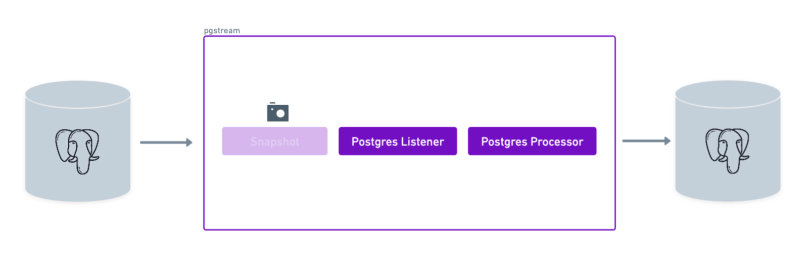
Requirements

  • A source PostgreSQL database
  • A target PostgreSQL database
  • pgstream (see installation instructions for more details)

Demo

Environment setup

The first step is to start the two PostgreSQL databases that will be used as the source and target for replication. The pgstream repository provides a Docker setup for this purpose, but any PostgreSQL servers with wal2json installed can be used. To start the docker provided PostgreSQL servers, run the following command:
docker-compose -f build/docker/docker-compose.yml --profile pg2pg up
This will start two PostgreSQL databases:
  • Source database on port 5432
  • Target database on port 7654

Database initialisation

Once both PostgreSQL servers are up and running, initialise pgstream on the source database. This step will create the pgstream schema in the configured Postgres database, along with the tables/functions/triggers required to keep track of the schema changes. See Tracking schema changes section for more details. It will also create a replication slot on the source database which will be used by the pgstream service. The initialisation step allows to provide both the URL of the PostgreSQL database and the name of the replication slot to be created. The PostgreSQL URL is required, but the replication slot name is optional. If not provided, it will default to pgstream_<dbname>_slot, where <dbname> is the name of the PostgreSQL database. The configuration can be provided either via CLI parameters or environment variables. For this tutorial, we’ll create a replication slot with the name pgstream_tutorial_slot.
  • Using the --init flag in the run command
  • Using CLI parameters:
pgstream init --postgres-url "postgres://postgres:postgres@localhost:5432?sslmode=disable" --replication-slot pgstream_tutorial_slot
  • Using environment variables:
PGSTREAM_POSTGRES_REPLICATION_SLOT_NAME=pgstream_tutorial_slot \
PGSTREAM_POSTGRES_LISTENER_URL=postgres://postgres:postgres@localhost:5432?sslmode=disable \
pgstream init
After initialization, you should see the following message:
SUCCESS  pgstream initialisation complete
If at any point the initialisation performed by pgstream needs to be reverted, all state will be removed by running the destroy CLI command.
pgstream destroy --postgres-url "postgres://postgres:postgres@localhost:5432?sslmode=disable" --replication-slot pgstream_tutorial_slot

Prepare pgstream configuration

Listener

The listener reads changes from the source database’s WAL. Configure it as follows:
PGSTREAM_POSTGRES_LISTENER_URL="postgres://postgres:postgres@localhost:5432?sslmode=disable"
PGSTREAM_POSTGRES_REPLICATION_SLOT_NAME=pgstream_tutorial_slot
If you want to perform an initial snapshot of existing tables, add:
PGSTREAM_POSTGRES_SNAPSHOT_STORE_URL="postgres://postgres:postgres@localhost:5432?sslmode=disable"
#
PGSTREAM_POSTGRES_SNAPSHOT_TABLES="test_schema.* test"
Further configuration can be provided to optimize the performance of the snapshot process. For more information, check the snapshot tutorial.

Processor

The processor writes changes to the target database. The only required value is the URL of the target database. Configure it as follows:
PGSTREAM_POSTGRES_WRITER_TARGET_URL="postgres://postgres:postgres@localhost:7654?sslmode=disable"
If we need to disable triggers on the target database during the replication process(ie., to avoid foreign key constraint violations), we can do so by setting the following variable:
PGSTREAM_POSTGRES_WRITER_DISABLE_TRIGGERS=true
For further granularity, we can also configure the action that should be taken when there’s a conflict on an insert.
PGSTREAM_POSTGRES_WRITER_ON_CONFLICT_ACTION=nothing
The PostgreSQL writer uses batching under the hood to reduce the number of IO calls to the target database and improve performance. The batch size and send timeout can both be configured to be able to better fit the different traffic patterns. The writer will send a batch when the timeout or the batch size is reached, whichever happens first.
PGSTREAM_POSTGRES_WRITER_BATCH_SIZE=25
PGSTREAM_POSTGRES_WRITER_BATCH_TIMEOUT=5s
For the PostgreSQL writer to keep track of DDL changes, it needs to keep track of the schema log. To enable this behaviour, an environment variable needs to be configured to point to the pgstream.schema_log store database. In this case, it will be the same as the source PostgreSQL database, since that’s where we’ve initialised pgstream.
PGSTREAM_POSTGRES_WRITER_SCHEMALOG_STORE_URL="postgres://postgres:postgres@localhost:5432?sslmode=disable"
Save the configuration in a file named pg2pg_tutorial.env. An equivalent pg2pg_tutorial.yaml configuration can be found below the environment one, and can be used interchangeably.
PGSTREAM_POSTGRES_LISTENER_URL="postgres://postgres:postgres@localhost:5432?sslmode=disable"
PGSTREAM_POSTGRES_REPLICATION_SLOT_NAME=pgstream_tutorial_slot

PGSTREAM_POSTGRES_WRITER_TARGET_URL="postgres://postgres:postgres@localhost:7654?sslmode=disable"
PGSTREAM_POSTGRES_WRITER_BATCH_SIZE=25
PGSTREAM_POSTGRES_WRITER_BATCH_TIMEOUT=5s
PGSTREAM_POSTGRES_WRITER_SCHEMALOG_STORE_URL="postgres://postgres:postgres@localhost:5432?sslmode=disable"
PGSTREAM_POSTGRES_WRITER_DISABLE_TRIGGERS=true
PGSTREAM_POSTGRES_WRITER_ON_CONFLICT_ACTION=nothing
source:
  postgres:
    url: "postgres://postgres:postgres@localhost:5432?sslmode=disable"
    mode: replication # options are replication, snapshot or snapshot_and_replication
    replication:
      replication_slot: pgstream_tutorial_slot

target:
  postgres:
    url: "postgres://postgres:postgres@localhost:7654?sslmode=disable"
    batch:
      timeout: 5000 # batch timeout in milliseconds
      size: 25 # number of messages in a batch
    schema_log_store_url: "postgres://postgres:postgres@localhost:5432?sslmode=disable" # url to the postgres database where the schema log is stored to be used when performing schema change diffs
    disable_triggers: false # whether to disable triggers on the target database
    on_conflict_action: "nothing" # options are update, nothing or error

Validate pgstream status

We can validate that the initialisation and the configuration are valid by running the status command before starting pgstream.
./pgstream status -c pg2pg_tutorial.yaml
./pgstream status -c pg2pg_tutorial.env
SUCCESS  pgstream status check encountered no issues
Initialisation status:
 - Pgstream schema exists: true
 - Pgstream schema_log table exists: true
 - Migration current version: 7
 - Migration status: success
 - Replication slot name: pgstream_tutorial_slot
 - Replication slot plugin: wal2json
 - Replication slot database: postgres
Config status:
 - Valid: true
Transformation rules status:
 - Valid: true
Source status:
 - Reachable: true

Run pgstream

Run pgstream with the prepared configuration. In this case we set the log level as trace to provide more context for debugging and have more visibility into what pgstream is doing under the hood.
pgstream run -c pg2pg_tutorial.env --init --log-level trace

pgstream run -c pg2pg_tutorial.env --log-level trace

pgstream run -c pg2pg_tutorial.yaml --log-level trace

pgstream run --source postgres --source-url "postgres://postgres:postgres@localhost:5432?sslmode=disable" --target postgres --target-url "postgres://postgres:postgres@localhost:7654?sslmode=disable" --log-level trace

Verify Replication

Schema Changes

  1. Connect to the source database:
    psql postgresql://postgres:postgres@localhost:5432/postgres
    
  2. Create a table:
    CREATE TABLE test(id SERIAL PRIMARY KEY, name TEXT);
    
  3. Connect to the target database:
    psql postgresql://postgres:postgres@localhost:7654/postgres
    
  4. Verify the table was replicated:
     \d+ test
    +--------+---------+-----------+----------+--------------+-------------+
    | Column | Type    | Modifiers | Storage  | Stats target | Description |
    |--------+---------+-----------+----------+--------------+-------------|
    | id     | integer |  not null | plain    | <null>       | <null>      |
    | name   | text    |           | extended | <null>       | <null>      |
    +--------+---------+-----------+----------+--------------+-------------+
    
Similarly when performing other DDL operations, they should be properly replicated on the target database.
ALTER TABLE test RENAME TO tutorial_test;
ALTER TABLE tutorial_test ADD COLUMN age INT DEFAULT 0;
ALTER TABLE tutorial_test ALTER COLUMN age TYPE bigint;
ALTER TABLE tutorial_test RENAME COLUMN age TO new_age;
ALTER TABLE tutorial_test DROP COLUMN new_age;
DROP TABLE tutorial_test;

Data Changes

  1. Insert data into the source database:
    INSERT INTO test(name) VALUES('alice'),('bob'),('charlie');
    
  2. Verify the data was replicated to the target database:
    SELECT * FROM test;
    

Troubleshooting

Here are some common issues you might encounter while following this tutorial and how to resolve them:

1. Error: Connection refused

  • Cause: The PostgreSQL database is not running or the connection URL is incorrect.
  • Solution:
    • Ensure the Docker containers for the source and target databases are running.
    • Verify the database URLs in the configuration file (pg2pg_tutorial.env).
    • Test the connection using psql:
      psql postgresql://postgres:postgres@localhost:5432/postgres
      

2. Error: Replication slot not found

  • Cause: The replication slot was not created during initialization.
  • Solution:
    • Reinitialize pgstream or manually create the replication slot.
    • Run the pgstream status command to validate the initialisation was successful.
    • Verify the replication slot exists by running:
      SELECT slot_name FROM pg_replication_slots;
      

3. Error: Target database does not contain replicated data

  • Cause: The replication process did not complete successfully or the target database URL is incorrect.
  • Solution:
    • Verify the target database URL in the configuration file.
    • Check the pgstream logs to confirm the replication process completed without errors.
    • Query the target database to ensure the data was replicated:
      SELECT * FROM test;
      

4. Error: Permission denied

  • Cause: The database user does not have sufficient privileges.
  • Solution:
    • Grant the required privileges to the database user:
      GRANT ALL PRIVILEGES ON DATABASE postgres TO postgres;
      

5. Error: Invalid configuration

  • Cause: The configuration file contains invalid or missing values.
  • Solution:
    • Double-check the pg2pg_tutorial.env file for typos or missing variables.
    • Refer to the pgstream configuration documentation for details on required variables.
    • Run the pgstream status command to validate the configuration is correct.

6. Error: Snapshot failed

  • Cause: The initial snapshot process encountered an issue.
  • Solution:
    • Ensure the PGSTREAM_POSTGRES_SNAPSHOT_TABLES variable is set if a snapshot is required.
    • Check the pgstream logs for detailed error messages:
      pgstream run -c pg2pg_tutorial.env --log-level trace
      
If you encounter issues not listed here, consult the pgstream documentation or open an issue on the project’s GitHub repository.

Summary

In this tutorial, we successfully configured pgstream to replicate data from a source PostgreSQL database to a target PostgreSQL database. We:
  1. Set up the source and target PostgreSQL databases using Docker.
  2. Initialized pgstream on the source database, creating the necessary schema and replication slot.
  3. Configured the listener to capture changes from the source database’s WAL.
  4. Configured the processor to replicate changes to the target database.
  5. Verified that both DML (data manipulation) and DDL (schema changes) were replicated correctly.
This tutorial demonstrates how pgstream can be used for real-time replication between PostgreSQL databases. For more advanced use cases, such as transformations or webhook integration, refer to the pgstream tutorials.