

Introduction
This tutorial will showcase the use of pgstream to replicate data from a PostgreSQL database to an OpenSearch cluster.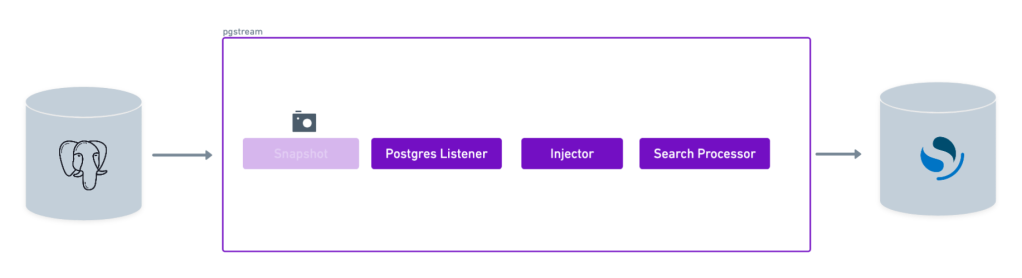
Requirements
- A source PostgreSQL database
- A target OpenSearch cluster
- pgstream (see installation instructions for more details)
Demo
Environment setup
The first step is to start the PostgreSQL database that will be used as source and the OpenSearch cluster that will be the target for replication. Thepgstream repository provides a docker installation that will be used for the purposes of this tutorial, but can be replaced by any available PostgreSQL server, as long as they have wal2json installed, and any OpenSearch cluster.
To start the docker provided PostgreSQL servers, run the following command:
5432 and an OpenSearch cluster on port 9200. It also starts OpenSearch dashboards UI on port 5601 to simplify visualisation of the OpenSearch documents, but we’ll be relying on curl for this tutorial.
Database initialisation
Once both the PostgreSQL server and the OpenSearch cluster are up and running, the next step is to initialise pgstream on the source database. This will create thepgstream schema in the configured Postgres database, along with the tables/functions/triggers required to keep track of the schema changes. See Tracking schema changes section for more details. This step will also create a replication slot on the source database which will be used by the pgstream service.
The initialisation step allows to provide both the URL of the PostgreSQL database and the name of the replication slot to be created. The PostgreSQL URL is required, but the replication slot name is optional. If not provided, it will default to pgstream_<dbname>_slot, where <dbname> is the name of the PostgreSQL database. The configuration can be provided either by using the CLI supported parameters, or using the environment variables.
For this tutorial, we’ll create a replication slot with the name pgstream_tutorial_slot.
-
Using the
--initflag in theruncommand - Using CLI parameters:
- Using environment variables:
destroy CLI command.
Prepare pgstream configuration
Listener
In order to run pgstream, we need to provide the configuration required to run the PostgreSQL to OpenSearch replication. First, we configure the listener module that will be listening to the WAL on the source PostgreSQL database. This requires the PostgreSQL database URL, which will be the one from the docker PostgreSQL server we started and setup in the previous steps.Processor
With the listener side ready, the next step is to configure the processor. Since we want to replicate to an OpenSearch cluster, we will need to set the search indexer configuration variables. The only required value is the URL of the cluster, where the replicated data from the source database will be written. We use the URL of the docker OpenSearch cluster we started earlier.pg2os_tutorial.env file to be used in the next step. An equivalent pg2os_tutorial.yaml configuration can be found below the environment one, and can be used interchangeably.
- Without initial snapshot
- With initial snapshot
Validate pgstream status
We can validate that the initialisation and the configuration are valid by running the status command before starting pgstream.
Run pgstream
With the configuration ready, we can now run pgstream. In this case we set the log level as trace to provide more context for debugging and have more visibility into what pgstream is doing under the hood.
Verify Replication
Now we can connect to the source database and create a table:public-1 index created in the OpenSearch cluster. The public-1 index is where the data for our tables in the public schema will be indexed.
pgstream index we can see there’s the version 1 of the schema.
public-1 index (which we can refer to by its alias public) will show no documents yet.
test is cv9bopq2e0ig0vt9s3n0, and the name column pgstream id is cv9bopq2e0ig0vt9s3n0-2. The id column is not explicitly mapped, but instead used as the document _id, prefixed by the table pgstream id to prevent collisions with other tables. Since the id is the primary key for this table, it was used as the document id. If the table had a composite primary key, the individual columns would be part of the _source, and the document _id would be a combination of their values.
If we decide to update the schema of the table we will see the pgstream index will get a new document with a new version of the schema.
cv9bopq2e0ig0vt9s3n0-3). Since adding a new column with the fault doesn’t trigger a table update, the existing documents will not be updated with the new column until they’re updated.
public OpenSearch index.
Troubleshooting
1. Error: Connection refused
- Cause: The PostgreSQL database or OpenSearch cluster is not running.
- Solution:
- Ensure the Docker containers are running.
- Verify the database and OpenSearch URLs in the configuration.
2. Error: Replication slot not found
- Cause: The replication slot was not created during initialization.
- Solution:
- Reinitialize
pgstreamor manually create the replication slot. - Run the
pgstream statuscommand to validate the initialisation was successful. - Verify the replication slot exists by running:
- Reinitialize
3. Error: Data not replicated to OpenSearch
- Cause: The OpenSearch cluster URL is incorrect or the processor configuration is invalid.
- Solution:
- Verify the OpenSearch URL in the configuration file.
- Check the
pgstreamlogs for errors:
4. Error: Permission denied
- Cause: The database user does not have sufficient privileges.
- Solution:
- Grant the required privileges to the database user:
- Grant the required privileges to the database user:
Summary
In this tutorial, we successfully configuredpgstream to replicate data from a PostgreSQL database to an OpenSearch cluster. We:
- Set up the source PostgreSQL database and target OpenSearch cluster.
- Initialized
pgstreamand created a replication slot. - Configured the listener and processor for OpenSearch replication.
- Verified that both schema changes and data changes were replicated correctly.
pgstream can be used to integrate PostgreSQL with OpenSearch for real-time indexing. For more advanced use cases, refer to the pgstream tutorials.