
Introduction

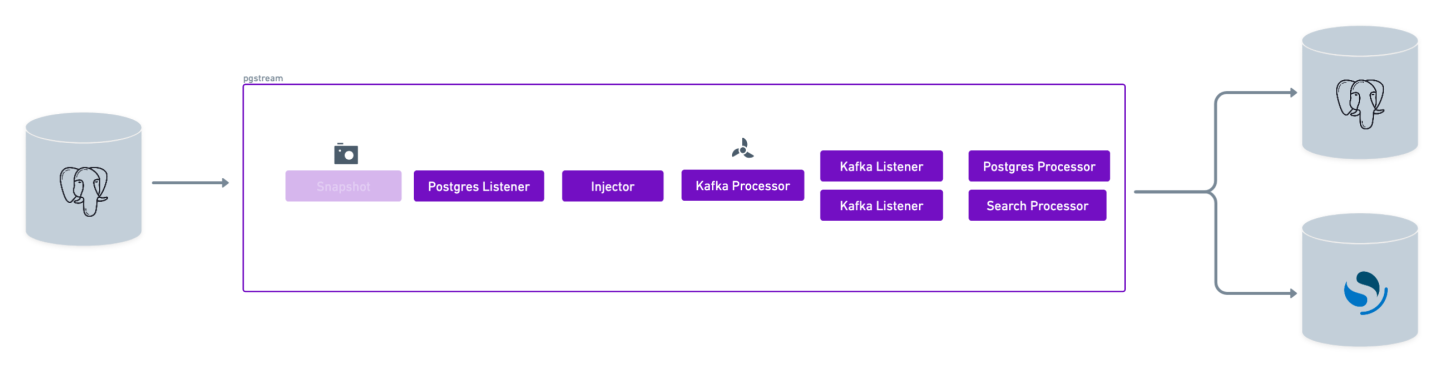
This tutorial will showcase the use of pgstream to replicate data from a PostgreSQL database to multiple targets (PostgreSQL and OpenSearch), leveraging Kafka. Kafka can also be used to replicate to a single target, to take advantage of the fan out model that allows for parallel processing of the WAL events thanks to topic partitioning. kafka tutorial
Requirements

  • A source PostgreSQL database
  • A target PostgreSQL database
  • A target OpenSearch cluster
  • A Kafka cluster
  • pgstream (see installation instructions for more details)

Environment setup

The first step is to start the PostgreSQL databases that will be used as source and the target PostgreSQL database and OpenSearch cluster for replication, along with the Kafka cluster. The pgstream repository provides a docker installation that will be used for the purposes of this tutorial, but can be replaced by any available PostgreSQL servers, as long as they have wal2json installed, and any Kafka and OpenSearch clusters. To start the docker provided PostgreSQL servers, OpenSearch cluster and Kafka cluster run the following command:
docker-compose -f build/docker/docker-compose.yml --profile pg2pg --profile pg2os --profile kafka up
This will start two PostgreSQL databases on ports 5432 and 7654, an OpenSearch cluster on port 9200 and a Kafka cluster on port 9092.

Database initialisation

Once all the resources are up and running, the next step is to initialise pgstream on the source database. This will create the pgstream schema in the configured Postgres database, along with the tables/functions/triggers required to keep track of the schema changes. See Tracking schema changes section for more details. This step will also create a replication slot on the source database which will be used by the pgstream service. The initialisation step allows to provide both the URL of the PostgreSQL database and the name of the replication slot to be created. The PostgreSQL URL is required, but the replication slot name is optional. If not provided, it will default to pgstream_<dbname>_slot, where <dbname> is the name of the PostgreSQL database. The configuration can be provided either by using the CLI supported parameters, or using the environment variables. For this tutorial, we’ll create a replication slot with the name pgstream_tutorial_slot.
  • Using CLI parameters:
pgstream init --postgres-url "postgres://postgres:postgres@localhost:5432?sslmode=disable" --replication-slot pgstream_tutorial_slot
  • Using environment variables:
PGSTREAM_POSTGRES_REPLICATION_SLOT_NAME=pgstream_tutorial_slot PGSTREAM_POSTGRES_LISTENER_URL=postgres://postgres:postgres@localhost:5432?sslmode=disable pgstream init
Successful initialisation should prompt the following message:
SUCCESS  pgstream initialisation complete
If at any point the initialisation performed by pgstream needs to be reverted, all state will be removed by running the destroy CLI command.
pgstream destroy --postgres-url "postgres://postgres:postgres@localhost:5432?sslmode=disable" --replication-slot pgstream_tutorial_slot

Prepare pgstream configuration

For this tutorial, we need to prepare 3 different configuration files, since we’ll be running 3 separate instances of pgstream, each handling one of the flows described below.

PostgreSQL -> Kafka

Listener

In order to run pgstream, we need to provide the configuration required to run the PostgreSQL replication. First, we configure the listener module that will be listening to the WAL on the source PostgreSQL database. This requires the PostgreSQL database URL, which will be the one from the docker PostgreSQL server we started and setup in the previous steps.
PGSTREAM_POSTGRES_LISTENER_URL="postgres://postgres:postgres@localhost:5432?sslmode=disable"
Since we’ve set a custom replication slot name, the configuration variable needs to be set accordingly so that it doesn’t use the default value.
PGSTREAM_POSTGRES_REPLICATION_SLOT_NAME=pgstream_tutorial_slot
The PostgreSQL WAL listener can be configured to perform an initial snapshot of the existing PostgreSQL database tables before starting to listen on the replication slot. In this case, we have no existing tables, so we don’t need to configure the initial snapshot. However, if there were tables with pre-existing data that we wanted to replicate to the target PostgreSQL database, we could configure it by setting the following environment variables:
PGSTREAM_POSTGRES_SNAPSHOT_STORE_URL="postgres://postgres:postgres@localhost:5432?sslmode=disable"

#
PGSTREAM_POSTGRES_SNAPSHOT_TABLES="test_schema.* test"
Further configuration can be provided to optimize the performance of the snapshot process. For more information, check the snapshot tutorial.

Processor

We will be using a Kafka processor which will be writing the WAL events into a Kafka topic. The topic is partitioned by schema. The only required configuration are the servers URLs and the topic settings. In our case, we’ll use the Kafka cluster initialised in the previous steps, and use a topic named pgstream.
PGSTREAM_KAFKA_WRITER_SERVERS="localhost:9092"
PGSTREAM_KAFKA_TOPIC_NAME=pgstream
PGSTREAM_KAFKA_TOPIC_PARTITIONS=1
PGSTREAM_KAFKA_TOPIC_REPLICATION_FACTOR=1
PGSTREAM_KAFKA_TOPIC_AUTO_CREATE=true
The Kafka processor can also be configured to use a TLS connection to the Kafka servers.
PGSTREAM_KAFKA_TLS_ENABLED=true
PGSTREAM_KAFKA_TLS_CA_CERT_FILE="broker.cer.pem"
PGSTREAM_KAFKA_TLS_CLIENT_CERT_FILE="client.cer.pem"
PGSTREAM_KAFKA_TLS_CLIENT_KEY_FILE="client.key.pem"
The Kafka processor uses batching under the hood to reduce the number of IO calls to Kafka and improve performance. The batch size and send timeout can both be configured to be able to better fit the different traffic patterns. The indexer will send a batch when the timeout or the batch size is reached, whichever happens first.
PGSTREAM_KAFKA_WRITER_BATCH_SIZE=25
PGSTREAM_KAFKA_WRITER_BATCH_TIMEOUT=5s
PGSTREAM_KAFKA_WRITER_BATCH_BYTE=1572864
Since we’ll be replicating data to OpenSearch, we need to add the injector processor wrapper in order to inject metadata into the WAL events. This helps identify the id and version of the event. By adding the wrapper to the kafka processor, we make the metadata available to all processors downstream of Kafka. If we only wanted to apply it to the OpenSearch processor we could add it to its configuration instead. More details about the injector can be found in the architecture section. We point the injector to the database where the pgstream.schema_log table is stored, which in our case it’s the source PostgreSQL database.
PGSTREAM_INJECTOR_STORE_POSTGRES_URL="postgres://postgres:postgres@localhost:5432?sslmode=disable"
The full configuration for the pg2kafka step can be put into a pg2kafka_tutorial.env file to be used later on. An equivalent pg2kafka_tutorial.yaml configuration can be found below the environment one, and can be used interchangeably.
  • Without initial snapshot
PGSTREAM_POSTGRES_LISTENER_URL="postgres://postgres:postgres@localhost:5432?sslmode=disable"
PGSTREAM_POSTGRES_REPLICATION_SLOT_NAME=pgstream_tutorial_slot

PGSTREAM_INJECTOR_STORE_POSTGRES_URL="postgres://postgres:postgres@localhost:5432?sslmode=disable"
PGSTREAM_KAFKA_WRITER_SERVERS="localhost:9092"
PGSTREAM_KAFKA_TOPIC_NAME=pgstream
PGSTREAM_KAFKA_TOPIC_PARTITIONS=1
PGSTREAM_KAFKA_TOPIC_REPLICATION_FACTOR=1
PGSTREAM_KAFKA_TOPIC_AUTO_CREATE=true
source:
  postgres:
    url: "postgres://postgres:postgres@localhost:5432?sslmode=disable"
    mode: replication
    replication:
      replication_slot: "pgstream_tutorial_slot"
target:
  kafka:
    servers: ["localhost:9092"]
    topic:
      name: "pgstream" # name of the Kafka topic
      partitions: 1 # number of partitions for the topic
      replication_factor: 1 # replication factor for the topic
      auto_create: true # whether to automatically create the topic if it doesn't exist
modifiers:
  injector:
    enabled: true # whether to inject pgstream metadata into the WAL events
  • With initial snapshot
PGSTREAM_POSTGRES_LISTENER_URL="postgres://postgres:postgres@localhost:5432?sslmode=disable"
PGSTREAM_POSTGRES_REPLICATION_SLOT_NAME=pgstream_tutorial_slot
PGSTREAM_POSTGRES_SNAPSHOT_STORE_URL="postgres://postgres:postgres@localhost:5432?sslmode=disable"
PGSTREAM_POSTGRES_SNAPSHOT_TABLES="*"

PGSTREAM_INJECTOR_STORE_POSTGRES_URL="postgres://postgres:postgres@localhost:5432?sslmode=disable"
PGSTREAM_KAFKA_WRITER_SERVERS="localhost:9092"
PGSTREAM_KAFKA_TOPIC_NAME=pgstream
PGSTREAM_KAFKA_TOPIC_PARTITIONS=1
PGSTREAM_KAFKA_TOPIC_REPLICATION_FACTOR=1
PGSTREAM_KAFKA_TOPIC_AUTO_CREATE=true
source:
  postgres:
    url: "postgres://postgres:postgres@localhost:5432?sslmode=disable"
    mode: replication
    replication:
      replication_slot: "pgstream_tutorial_slot"
    snapshot: # when mode is snapshot or snapshot_and_replication
      mode: full # options are data_and, schema or data
      tables: ["*"] # tables to snapshot, can be a list of table names or a pattern
      recorder:
        repeatable_snapshots: true # whether to repeat snapshots that have already been taken
        postgres_url: "postgres://postgres:postgres@localhost:5432?sslmode=disable" # URL of the database where the snapshot status is recorded
      schema: # when mode is full or schema
        mode: pgdump_pgrestore # options are pgdump_pgrestore or schemalog
        pgdump_pgrestore:
          clean_target_db: false # whether to clean the target database before restoring
target:
  kafka:
    servers: ["localhost:9092"]
    topic:
      name: "pgstream" # name of the Kafka topic
      partitions: 1 # number of partitions for the topic
      replication_factor: 1 # replication factor for the topic
      auto_create: true # whether to automatically create the topic if it doesn't exist
modifiers:
  injector:
    enabled: true # whether to inject pgstream metadata into the WAL events

Kafka -> PostgreSQL

Listener

In this case the listener will be a Kafka reader that will listen for the WAL events from the Kafka topic. The only configuration required are the kafka servers, the topic name and the consumer group id. We will use a consumer group for each of the targets, in this case pgstream-postgres-consumer-group.
PGSTREAM_KAFKA_READER_SERVERS="localhost:9092"
PGSTREAM_KAFKA_TOPIC_NAME=pgstream
PGSTREAM_KAFKA_READER_CONSUMER_GROUP_ID=pgstream-postgres-consumer-group
The configuration can be tweaked further by providing the start offset for the consumer group. Valid values are earliest or latest.
PGSTREAM_KAFKA_READER_CONSUMER_GROUP_START_OFFSET=earliest
The Kafka reader is in charge of committing the messages to Kafka once they’ve been processed, so that they’re not processed multiple times. It applies a default exponential backoff policy to this commit process, but it can be configured to select different parameters for the exponential backoff or to provide a non exponential backoff policy. Only one of the two will be applied, giving priority to the exponential backoff configuration if both are provided.
PGSTREAM_KAFKA_COMMIT_BACKOFF_INITIAL_INTERVAL=1s
PGSTREAM_KAFKA_COMMIT_BACKOFF_MAX_INTERVAL=1m
PGSTREAM_KAFKA_COMMIT_BACKOFF_MAX_RETRIES=60

PGSTREAM_KAFKA_COMMIT_BACKOFF_INTERVAL=0
PGSTREAM_KAFKA_COMMIT_BACKOFF_MAX_RETRIES=0

Processor

This configuration is the same as the one from the tutorial for PostgreSQL to PostgreSQL replication. More details here. The full configuration for the kafka2pg step can be put into a kafka2pg_tutorial.env file to be used later on. An equivalent kafka2pg_tutorial.yaml configuration can be found below the environment one, and can be used interchangeably.
PGSTREAM_KAFKA_READER_SERVERS="localhost:9092"
PGSTREAM_KAFKA_TOPIC_NAME=pgstream
PGSTREAM_KAFKA_READER_CONSUMER_GROUP_ID=pgstream-postgres-consumer-group

PGSTREAM_POSTGRES_WRITER_TARGET_URL="postgres://postgres:postgres@localhost:7654?sslmode=disable"
PGSTREAM_POSTGRES_WRITER_BATCH_SIZE=25
PGSTREAM_POSTGRES_WRITER_BATCH_TIMEOUT=5s
PGSTREAM_POSTGRES_WRITER_SCHEMALOG_STORE_URL="postgres://postgres:postgres@localhost:5432?sslmode=disable"
source:
  kafka:
    servers: ["localhost:9092"]
    topic:
      name: "pgstream"
    consumer_group:
      id: "pgstream-postgres-consumer-group"
      start_offset: "earliest" # options are earliest or latest
target:
  postgres:
    url: "postgres://postgres:postgres@localhost:7654?sslmode=disable"
    batch:
      timeout: 5000 # batch timeout in milliseconds
      size: 25 # number of messages in a batch
    schema_log_store_url: "postgres://postgres:postgres@localhost:5432?sslmode=disable"
    disable_triggers: false # whether to disable triggers on the target database
    on_conflict_action: "nothing" # options are update, nothing or error

Kafka -> OpenSearch

Listener

The configuration for the Kafka listener is the same as for the one in the previous step, the only difference will be the name of the consumer group id, to ensure it consumes the topic independently from the postgres one.
PGSTREAM_KAFKA_READER_SERVERS="localhost:9092"
PGSTREAM_KAFKA_TOPIC_NAME=pgstream
PGSTREAM_KAFKA_READER_CONSUMER_GROUP_ID=pgstream-opensearch-consumer-group

Processor

This configuration is the same as the one from the tutorial for PostgreSQL to OpenSearch replication. More details here. The full configuration for the kafka2opensearch step can be put into a kafka2os_tutorial.env file to be used later on. An equivalent kafka2os_tutorial.yaml configuration can be found below the environment one, and can be used interchangeably.
PGSTREAM_KAFKA_READER_SERVERS="localhost:9092"
PGSTREAM_KAFKA_TOPIC_NAME=pgstream
PGSTREAM_KAFKA_READER_CONSUMER_GROUP_ID=pgstream-opensearch-consumer-group

PGSTREAM_OPENSEARCH_STORE_URL="http://admin:admin@localhost:9200"
PGSTREAM_SEARCH_INDEXER_BATCH_SIZE=25
PGSTREAM_SEARCH_INDEXER_BATCH_TIMEOUT=5s
source:
  kafka:
    servers: ["localhost:9092"]
    topic:
      name: "pgstream"
    consumer_group:
      id: "pgstream-opensearch-consumer-group"
      start_offset: "earliest" # options are earliest or latest
target:
  search:
    engine: "opensearch" # options are elasticsearch or opensearch
    url: "http://admin:admin@localhost:9200" # URL of the search engine
    batch:
      timeout: 5000 # batch timeout in milliseconds
      size: 25 # number of messages in a batch

Validate pgstream status

We can validate that the initialisation and the configuration are valid by running the status command before starting pgstream. This can be run for all configuration files.
./pgstream status -c pg2kafka_tutorial.yaml
./pgstream status -c pg2kafka_tutorial.env
SUCCESS  pgstream status check encountered no issues
Initialisation status:
 - Pgstream schema exists: true
 - Pgstream schema_log table exists: true
 - Migration current version: 7
 - Migration status: success
 - Replication slot name: pgstream_tutorial_slot
 - Replication slot plugin: wal2json
 - Replication slot database: postgres
Config status:
 - Valid: true
Transformation rules status:
 - Valid: true
Source status:
 - Reachable: true

Run pgstream

With all configuration files ready, we can now run pgstream. In this case we set the log level as trace to provide more context for debugging and have more visibility into what pgstream is doing under the hood. As mentioned above, we’ll need to run 3 different pgstream services on separate terminals, one with each configuration file.
pgstream run -c pg2kafka_tutorial.env --log-level trace

pgstream run -c pg2kafka_tutorial.yaml --log-level trace

pgstream run --source postgres --source-url "postgres://postgres:postgres@localhost:5432?sslmode=disable" --target kafka --target-url "localhost:9092" --log-level trace
pgstream run -c kafka2pg_tutorial.env --log-level trace

pgstream run -c kafka2pg_tutorial.yaml --log-level trace

pgstream run --source kafka --source-url "localhost:9092" --target postgres --target-url "postgres://postgres:postgres@localhost:7654?sslmode=disable" --log-level trace
pgstream run -c kafka2os_tutorial.env --log-level trace

pgstream run -c kafka2os_tutorial.yaml --log-level trace

pgstream run --source kafka --source-url "localhost:9092" --target opensearch --target-url "http://localhost:9200" --log-level trace
First we connect and create a table in the source PostgreSQL database.
 psql postgresql://postgres:postgres@localhost:5432/postgres
CREATE TABLE test(id SERIAL PRIMARY KEY, name TEXT);

Verify Replication

We should now be able to see the table created in the target PostgreSQL database:
 psql postgresql://postgres:postgres@localhost:7654/postgres
postgres@localhost:postgres> \d+ test
+--------+---------+-----------+----------+--------------+-------------+
| Column | Type    | Modifiers | Storage  | Stats target | Description |
|--------+---------+-----------+----------+--------------+-------------|
| id     | integer |  not null | plain    | <null>       | <null>      |
| name   | text    |           | extended | <null>       | <null>      |
+--------+---------+-----------+----------+--------------+-------------+
Indexes:
    "test_pkey" PRIMARY KEY, btree (id)
Has OIDs: no
And see the table in the schema log document of the newly created pgstream index on the OpenSearch cluster:
curl -X GET -u admin:admin http://localhost:9200/pgstream/_search | jq .
{
  "took": 31,
  "timed_out": false,
  "_shards": {
    "total": 1,
    "successful": 1,
    "skipped": 0,
    "failed": 0
  },
  "hits": {
    "total": {
      "value": 1,
      "relation": "eq"
    },
    "max_score": 1.0,
    "hits": [
      {
        "_index": "pgstream",
        "_id": "cv9esaav80ig0h81pkj0",
        "_score": 1.0,
        "_source": {
          "id": "cv9esaav80ig0h81pkj0",
          "version": 1,
          "schema_name": "public",
          "created_at": "2025-03-13 14:39:37.295222",
          "schema": "{\"tables\":[{\"oid\":\"16464\",\"name\":\"test\",\"columns\":[{\"name\":\"id\",\"type\":\"integer\",\"default\":\"nextval('public.test_id_seq'::regclass)\",\"nullable\":false,\"unique\":true,\"metadata\":null,\"pgstream_id\":\"cv9esaav80ig0h81pkjg-1\"},{\"name\":\"name\",\"type\":\"text\",\"nullable\":true,\"unique\":false,\"metadata\":null,\"pgstream_id\":\"cv9esaav80ig0h81pkjg-2\"}],\"primary_key_columns\":[\"id\"],\"pgstream_id\":\"cv9esaav80ig0h81pkjg\"}]}",
          "acked": false
        }
      }
    ]
  }
}
As well as seeing a public index, with no documents for now (since there’s no data in the table):
curl -X GET -u admin:admin http://localhost:9200/public/_search | jq .
{
  "took": 16,
  "timed_out": false,
  "_shards": {
    "total": 1,
    "successful": 1,
    "skipped": 0,
    "failed": 0
  },
  "hits": {
    "total": {
      "value": 0,
      "relation": "eq"
    },
    "max_score": null,
    "hits": []
  }
}
We can insert data into the source database test table, which should then appear in the target PostgreSQL database as well as the OpenSearch public index.
 psql postgresql://postgres:postgres@localhost:5432/postgres
INSERT INTO test(name) VALUES('alice'),('bob'),('charlie');
 psql postgresql://postgres:postgres@localhost:7654/postgres
postgres@localhost:postgres> select * from test;
+----+---------+
| id | name    |
|----+---------|
| 1  | alice   |
| 2  | bob     |
| 3  | charlie |
+----+---------+
curl -X GET -u admin:admin http://localhost:9200/public/_search | jq .
{
  "took": 399,
  "timed_out": false,
  "_shards": {
    "total": 1,
    "successful": 1,
    "skipped": 0,
    "failed": 0
  },
  "hits": {
    "total": {
      "value": 3,
      "relation": "eq"
    },
    "max_score": 1.0,
    "hits": [
      {
        "_index": "public-1",
        "_id": "cv9esaav80ig0h81pkjg_1",
        "_score": 1.0,
        "_source": {
          "_table": "cv9esaav80ig0h81pkjg",
          "cv9esaav80ig0h81pkjg-2": "alice"
        }
      },
      {
        "_index": "public-1",
        "_id": "cv9esaav80ig0h81pkjg_2",
        "_score": 1.0,
        "_source": {
          "_table": "cv9esaav80ig0h81pkjg",
          "cv9esaav80ig0h81pkjg-2": "bob"
        }
      },
      {
        "_index": "public-1",
        "_id": "cv9esaav80ig0h81pkjg_3",
        "_score": 1.0,
        "_source": {
          "_table": "cv9esaav80ig0h81pkjg",
          "cv9esaav80ig0h81pkjg-2": "charlie"
        }
      }
    ]
  }
}
All other operations will be cascaded to both targets accordingly. For more details on each individual target, check out the PostgreSQL to PostgreSQL replication and the PostgreSQL to OpenSearch replication tutorials.

Troubleshooting

Here are some common issues you might encounter while following this tutorial and how to resolve them:

1. Error: Connection refused

  • Cause: The PostgreSQL database, Kafka cluster, or OpenSearch cluster is not running.
  • Solution:
    • Ensure the Docker containers for all services are running.
    • Verify the database, Kafka, and OpenSearch URLs in the configuration files.
    • Test the connections using the following commands:
      psql postgresql://postgres:postgres@localhost:5432/postgres
      curl -X GET http://localhost:9200
      kafka-topics.sh --list --bootstrap-server localhost:9092
      

2. Error: Replication slot not found

  • Cause: The replication slot was not created during initialization.
  • Solution:
    • Reinitialize pgstream or manually create the replication slot.
    • Run the pgstream status command to validate the initialisation was successful.
    • Verify the replication slot exists by running:
      SELECT slot_name FROM pg_replication_slots;
      

3. Error: Kafka topic not found

  • Cause: The Kafka topic was not created automatically or the topic name is incorrect.
  • Solution:
    • Ensure the PGSTREAM_KAFKA_TOPIC_AUTO_CREATE variable is set to true in the configuration.
    • Manually create the topic using the Kafka CLI:
      kafka-topics.sh --create --topic pgstream --bootstrap-server localhost:9092 --partitions 1 --replication-factor 1
      

4. Error: Data not replicated to targets

  • Cause: The Kafka consumer groups for PostgreSQL or OpenSearch are not configured correctly.
  • Solution:
    • Verify the consumer group IDs in the configuration files.
    • Check the pgstream logs for errors:
      pgstream run -c kafka2pg_tutorial.env --log-level trace
      pgstream run -c kafka2os_tutorial.env --log-level trace
      

5. Error: Permission denied

  • Cause: The database user does not have sufficient privileges.
  • Solution:
    • Grant the required privileges to the database user:
      GRANT ALL PRIVILEGES ON DATABASE postgres TO postgres;
      

6. Error: OpenSearch index not created

  • Cause: The OpenSearch processor is not configured correctly.
  • Solution:
    • Verify the OpenSearch URL in the configuration file.
    • Check the pgstream logs for errors:
      pgstream run -c kafka2os_tutorial.env --log-level trace
      

7. Error: Kafka TLS connection failed

  • Cause: The Kafka TLS certificates are not configured correctly.
  • Solution:
    • Verify the paths to the certificate files in the configuration:
      PGSTREAM_KAFKA_TLS_CA_CERT_FILE="broker.cer.pem"
      PGSTREAM_KAFKA_TLS_CLIENT_CERT_FILE="client.cer.pem"
      PGSTREAM_KAFKA_TLS_CLIENT_KEY_FILE="client.key.pem"
      
    • Ensure the certificates are valid and match the Kafka server configuration.
If you encounter issues not listed here, consult the pgstream documentation or open an issue on the project’s GitHub repository.

Summary

In this tutorial, we successfully configured pgstream to replicate data from a PostgreSQL database to multiple targets (PostgreSQL and OpenSearch) using Kafka as an intermediary. We:
  1. Set up the source PostgreSQL database, target PostgreSQL database, OpenSearch cluster, and Kafka cluster.
  2. Initialized pgstream on the source database, creating the necessary schema and replication slot.
  3. Configured three separate pgstream instances:
    • PostgreSQL to Kafka
    • Kafka to PostgreSQL
    • Kafka to OpenSearch
  4. Verified that schema changes and data changes were replicated correctly across all targets.
This tutorial demonstrates how pgstream can leverage Kafka for scalable, real-time replication to multiple targets. For more advanced use cases, refer to the pgstream tutorials.