

Introduction
This tutorial will showcase the use of pgstream to snapshot data from a PostgreSQL database. For this tutorial, we’ll use a PostgreSQL target.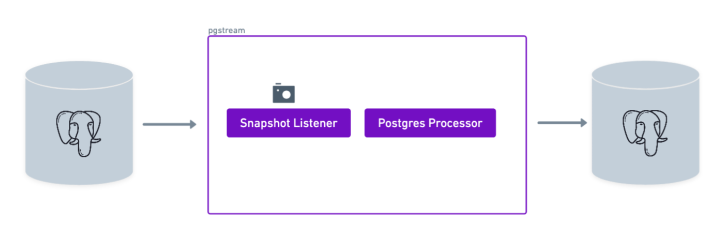
Requirements
- A source PostgreSQL database
- A target PostgreSQL database
- pgstream (see installation instructions for more details)
Environment setup
The first step is to start the two PostgreSQL databases that will be used as source and target for the snapshot. Thepgstream repository provides a docker installation that will be used for the purposes of this tutorial, but can be replaced by any available PostgreSQL servers.
To start the docker provided PostgreSQL servers, run the following command:
5432 and 7654.
Database initialisation
Normally we need to initialise pgstream on the source database. The initialisation step creates thepgstream schema in the configured Postgres database, along with the tables/functions/triggers required for DDL tracking. It also creates the replication slot. However, this is only required if we’re going to be using the replication slot. If we’re using a PostgreSQL target for the snapshot, pgstream supports using pg_dump/pg_restore for the schema snapshot, which removes the need to keep any pgstream state in the source PostgreSQL database.
Prepare pgstream configuration
Listener
In order to run pgstream, we need to provide the configuration required to run the PostgreSQL to PostgreSQL snapshot. First, we configure the listener module that will be producing the snapshot of the source PostgreSQL database. This requires the PostgreSQL database URL, which will be the one from the docker PostgreSQL server we started and setup in the previous steps.public schema will be assumed. Wildcards are supported. For example, test_schema.* will snapshot all tables in the test_schema schema, and test will snapshot the public.test table.
test_table and test_table_2, PGSTREAM_POSTGRES_SNAPSHOT_EXCLUDED_TABLES can be used.
snapshot_requests under the pgstream schema. This allows to only perform a given snapshot once by keeping track of what’s already been completed. All it’s needed is the URL of the database where the table should be created. For this tutorial, we’ll use the source database.
Processor
With the listener side ready, the next step is to configure the processor. Since we want the snapshot reach a PostgreSQL database, we will set the PostgreSQL writer configuration variables. The only required value is the URL of the target database, where the snapshotted schema/data from the source database will be streamed. We use the URL of the docker PostgreSQL database we started earlier (note the port is the only difference between the source and the target PostgreSQL databases).snapshot2pg_tutorial.env file to be used in the next step. An equivalent snapshot2pg_tutorial.yaml configuration can be found below the environment one, and can be used interchangeably.
Preparing snapshot data
Now we can connect to the source database and create a table and populate it with some data that we’ll want to snapshot.Perform snapshot
With the configuration ready, we can now run pgstream. In this case we set the log level as trace to provide more context for debugging and have more visibility into what pgstream is doing under the hood. Once the snapshot finishes, the process will stop.Verify snapshot
If we connect to the target database, we should now see the test table created and populated with the data from the snapshot.pgstream.snapshot_requests table on the source database. It should contain the details of the snapshot that has been requested.
Troubleshooting
Here are some common issues you might encounter while following this tutorial and how to resolve them:1. Error: Connection refused
- Cause: The PostgreSQL database is not running or the connection URL is incorrect.
- Solution:
- Ensure the Docker containers for the source and target databases are running.
- Verify the database URLs in the configuration file (
snapshot2pg_tutorial.env). - Test the connection using
psql:
2. Error: Snapshot failed
- Cause: There may be issues with the configuration or permissions.
- Solution:
- Check the pgstream logs for detailed error messages:
- Ensure the source database user has the necessary permissions to read the schema and data.
- Check the
pgstream.snapshot_requeststable for error details:
- Check the pgstream logs for detailed error messages:
3. Error: Target database does not contain the snapshot data
- Cause: The snapshot process did not complete successfully or the target database URL is incorrect.
- Solution:
- Verify the target database URL in the configuration file.
- Check the pgstream logs to confirm the snapshot process completed without errors.
-
Check the
pgstream.snapshot_requeststable for error details: -
Query the target database to ensure the data was replicated:
4. Error: pgstream: invalid configuration
- Cause: The configuration file contains invalid or missing values.
- Solution:
- Double-check the
snapshot2pg_tutorial.envfile for typos or missing variables. - Refer to the pgstream configuration documentation for details on required variables.
- Run the
pgstream statuscommand to validate the configuration is correct.
- Double-check the
5. Error: Permission denied
- Cause: The database user does not have sufficient privileges.
- Solution:
- Ensure the user has the necessary permissions to create tables, replication slots, and perform snapshots.
- Grant the required privileges:
Summary
In this tutorial, we successfully configuredpgstream to snapshot data from a source PostgreSQL database to a target PostgreSQL database. We covered the following steps:
- Set up the source and target PostgreSQL databases using Docker.
- Configured the
pgstreamlistener and processor for snapshotting. - Created a sample table in the source database and populated it with data.
- Ran
pgstreamto perform the snapshot. - Verified that the data was successfully replicated to the target database.
pgstream can be used to efficiently snapshot data between PostgreSQL databases. For more advanced use cases, such as continuous replication or applying transformations, refer to the other pgstream tutorials.