Building production AI apps with Xata and Claude Code
Build production-ready AI apps with Xata, Claude Code and Postgres workflows for safe migrations, branching and anonymized data cloning.
By:
Zack ProserPublished:
Reading time:
8 min readI've shipped more production AI features in the last six months than in the previous two years combined. Not because I got smarter — because the tools finally caught up to the ambition.
Coding agents can now take a well-described plan and implement a complete application end to end. The models keep getting better, and developers who know how to work with them are operating at a level that would have been unthinkable a year ago.
But every one of those features hit the same wall: everything works in dev, and then production happens. Real users with data you didn't expect, PII you can't touch, and schema changes that grind your database to a halt.
Whether you're new to AI development or deep in it, this tutorial gives you the stack and agent skills to ship with confidence.
How Xata helps you ship production AI apps faster
AI prod challenge | Xata solution |
|---|---|
Schema changes break production | Zero-downtime migrations via pgroll |
Shared dev database chaos | Instant copy-on-write branches |
Can't access prod data (PII) | Anonymized cloning preserves data structure |
Slow iteration on data models | Branch-per-feature isolation |
Xata is a Postgres platform built for the way AI apps actually ship: fast iteration, safe deployments and access to real data without the compliance nightmares.
When you finish this 10 minute tutorial, you'll have:
- A workflow designed for production ready AI development: branch per feature, zero-downtime migrations, anonymized production clones
- A Next.js app with users, roles and teams
- Claude Code slash commands that turn database operations into conversations — branch, migrate and clone without memorizing CLI syntax
Other Postgres providers give you a database, while Xata gives you the infrastructure to actually ship it.
Step 1: Create your Xata account
Following along with this tutorial will require a Xata account. You can get access today with a free trial.
Create your free Xata account →
You'll see a welcome screen where you create your first organization, project and branch.
Step 2: Install the Xata CLI
CLIs are ideal in our agentic era, because both human developers and LLMs/agents like Claude Code can make efficient use of them, providing a standard service interface:
Add to your PATH (add this to .bashrc or .zshrc):
Verify:
Step 3: Clone the starter
The starter includes Claude Code skills that wrap the Xata CLI into slash commands. We'll use these in Step 9 — for now, we'll run the CLI directly so you understand what's happening under the hood.
Step 4: Connect to your project
Follow the prompts to select your organization, project and branch. You'll see something like this:
Get your connection string:
Add it to .env.local:
Step 5: Run the users migration
The AI prod challenge: You're building fast. Your data model is evolving as you figure out what features work. You need a migration system that doesn't slow you down, but also won't explode when you have real users.
How Xata solves it: pgroll gives you the same zero-downtime migration workflow from day one. You build the habit early, and it scales with you.
First, initialize pgroll in your database. This is a one-time setup that creates the internal state pgroll needs to manage migrations:
The starter already includes three migration files in the migrations/ directory. Let's walk through each one. Here's what migrations/001_create_users.yaml looks like:
Run it:
roll start begins the expand phase — pgroll creates the table and sets up a versioned schema view so old and new code can coexist.
roll complete runs the contract phase — the old schema view is removed, leaving only the final state.
Why not just use Prisma/Drizzle migrations? You can. pgroll gives you something ORM migrations don't: zero-downtime schema changes with automatic rollback. ORM migrations lock tables and hope for the best.
Verify your table exists:
Add a couple of test users so you can see the app working:
Start the app:
You should see your two users in the app. The teams section will show a prompt to run migration 003 — we'll get there.
Step 6: Add roles without breaking production
The AI prod challenge: Your AI feature needs role-based access. Admins see different data than regular users. Maybe admins can trigger model retraining or access analytics dashboards. You need to add a column to an existing table while your app is running.
What happens with basic Postgres: You schedule a maintenance window, run the migration, then pray that it goes quickly. If you have a lot of rows, you're down for minutes. If something goes wrong, your rollback is "restore from backup."
How Xata solves it: pgroll's expand-contract pattern runs both schemas simultaneously. Old code keeps working. New code uses the new column. Dual-write triggers keep them in sync.
First, create a branch:
Xata uses copy-on-write, so you get a complete copy of your database without duplicating storage. Get the connection string:
Update .env.local. Now let's look at the next migration. Here's migrations/002_add_role.yaml:
Run it:
pgroll adds the column and installs dual-write triggers so both the old schema (without role) and new schema (with role) serve traffic simultaneously. Existing users get role = 'member'.
Test your changes, deploy your new code and verify everything works with both schemas running.
The old schema view is removed and triggers are cleaned up — your migration is live with zero downtime.
With other Postgres providers, this migration is a chore. With Xata, it's Tuesday afternoon during a coffee break.
Step 7: Add teams — Multi-tenant AI without fear
The AI prod challenge: Your AI app is taking off. Different customers want isolated data. They want to use their documents, their model outputs, their usage analytics. You need multi-tenancy. That means a new table and a foreign key on users.
Adding a foreign key to an existing table is the migration that makes teams delay features for weeks. What if it locks the table? What if it fails halfway through?
How Xata solves it: Same pattern. Branch, migrate, test, complete. The FK constraint is added during the expand phase without blocking reads or writes.
Update .env.local. Here's the final migration, migrations/003_add_teams.yaml:
pgroll creates the teams table and adds the team_id foreign key to users in a single atomic expand phase — existing users get team_id = null and your old code keeps running.
The contract phase finalizes the schema, and your multi-tenant data model is live.
Add a team and assign your users:
Refresh the app — you'll see users with roles and team assignments, all built through zero-downtime migrations.
Step 8: Debug AI issues with real data
The AI prod challenge: This is the one that kills AI apps.
Your RAG system worked perfectly in testing. Your recommendations made sense with synthetic data. Your embeddings clustered beautifully with your 500 test documents.
Then real users show up. Their documents have weird formatting. Their queries use terminology you didn't anticipate. The edge cases in production data reveal model behaviors you never saw in development.
You need to debug with production data. But production has PII including emails, names and phone numbers. Running a pg_dump to your laptop exposes you and your employer to too much risk.
The options with basic Postgres:
- Write anonymization scripts: Maintain them as your schema evolves, continually review the output to ensure you didn't miss anything. Are you sure you even know which identifiers are protected by privacy law? There are 18 of them, including IP Address.
- Use synthetic data: Keep missing the bugs that only real distributions reveal.
- Access production directly: Wait for the security incident.
How Xata solves it:
Xata clones your database, running every row through pgstream's anonymization. Emails become fake emails. Names become fake names. Referential integrity is maintained throughout tables and foreign key relationships.
Why this matters for AI: Your model's behavior depends on data distributions. If your production users write queries differently than your test users, your RAG system behaves differently.
If your production documents have different length distributions, your chunking strategy might fail. Synthetic data can't reveal these issues. Anonymized production data can.
Configure what gets anonymized:
Xata auto-detects columns named email, name, phone, ssn, etc. You can customize the transforms for anything it misses.
Step 9: Use Claude Code for your Xata workflow
You've been running Xata CLI commands manually. The starter repo includes Claude Code project commands that let you do all of this through natural language instead.
Claude Code skills live in .claude/skills/ and show up as slash commands when you type /project: inside Claude Code. Each skill is a markdown file with instructions that Claude Code follows. The starter includes six:
Command | What it does |
|---|---|
| Runs |
| Creates a branch, waits for it to be ready, gets the connection string |
| Starts a migration with |
| Completes the expand-contract cycle |
| Rolls back a failed migration |
| Clones a database with PII anonymization |
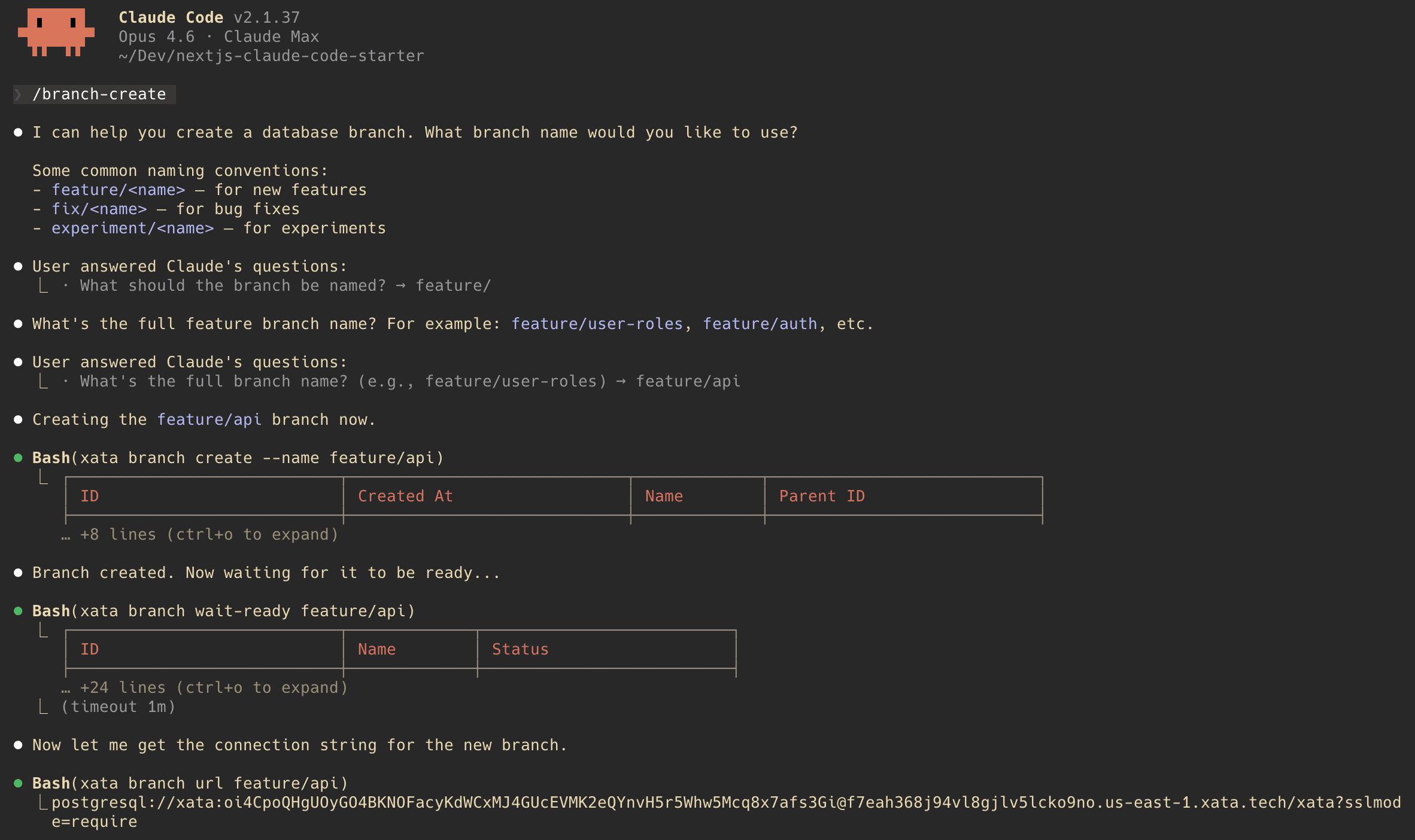
Try it. Open Claude Code in the project directory and run:
Claude Code will ask you for a branch name, then run xata branch create, xata branch wait-ready and xata branch url for you — and update your .env.local with the new connection string.
Or ask it in plain English:
Claude Code reads the command files, understands the Xata CLI and executes the right sequence. This is the agentic workflow: your database operations become conversations, and Claude Code handles the CLI choreography.
The skills are just markdown files — you can customize them, add new ones or extend them for your own workflows.
What pgroll does
Traditional migrations lock the table, make the change, unlock. If the change takes time, your app is down.
pgroll uses an expand-contract pattern:
Expand (xata roll start):
- Creates new columns/tables
- Sets up views for both old and new schemas
- Installs triggers to keep both in sync
- Both versions of your app work simultaneously
Contract (xata roll complete):
- Removes old schema views
- Drops sync triggers
- Cleans up
If something goes wrong, xata roll rollback reverses the expand phase. No data loss.
The commands
Command | What it does |
|---|---|
| Authenticate |
| Link project to folder |
| Create isolated branch |
| Wait for branch to be ready |
| Get connection string |
| One-time pgroll setup |
| Begin expand phase |
| Contract phase |
| Undo if needed |
| Check migration progress |
| Clone with anonymization |
What you've built
- Users, roles and teams — The data model for multi-tenant AI apps
- Production-grade migrations that don't require downtime or coordination
- Isolated branches for each feature, no more shared dev database chaos
- Safe access to production data patterns for debugging AI behavior
Other Postgres providers stop at giving you a database. Xata gives you the platform to actually ship AI apps to production and keep shipping as they evolve.
Where to go next
Resources
For teams building AI apps that need to actually ship.
Experience Xata with $100 free credits
Give every agent its own Postgres branch with real data, instantly, without killing your budget.
Related Posts
Closing the loop: Building a coding agent that uses Postgres branches
Explore how to build an AI coding agent that follows a full developer workflow, including creating Postgres branches, using a sandbox, fixing bugs, and raising pull requests with Xata, Vercel, and GitHub.
From DBA to DB Agents
Discover how a PostgreSQL DBA’s decade of expertise evolved into designing Xata’s AI-powered Postgres agent, automating monitoring and observability.
Teaching Claude Code to use isolated database branches with Agent Skills
Learn how to set up the Xata Agent Skill in minutes. Enable Claude Code to access realistic data using isolated database branches for safer, faster debugging.
Database branching for AI coding agents: a minimal, CLI-first setup that actually works
Learn how to enable database branching for coding agents like Claude Code and Amp Code using simple Xata CLI instructions in AGENTS.md. No complex skills required.