> ## Documentation Index
> Fetch the complete documentation index at: https://xata.io/docs/llms.txt
> Use this file to discover all available pages before exploring further.
# PostgreSQL anonymization
## Introduction
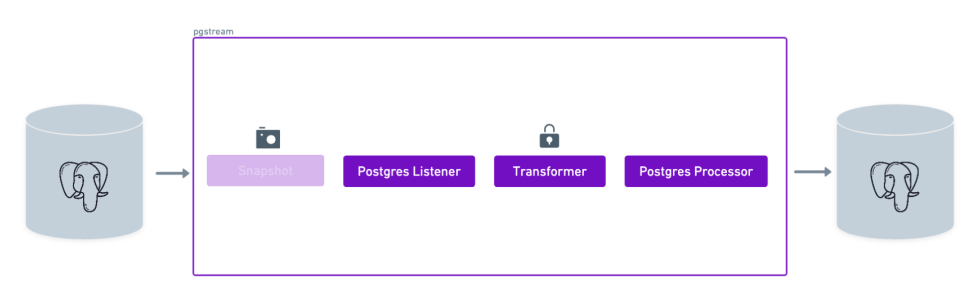
This tutorial will showcase the use of pgstream to replicate data from PostgreSQL using transformers. We'll use a target PostgreSQL database as target, but the same would apply to any of the supported targets.
### Requirements
* A source PostgreSQL database
* A target PostgreSQL database
* pgstream (see [installation](../../README.md#installation) instructions for more details)
### Demo
## Environment setup
The first step is to start the two PostgreSQL databases that will be used as source and target for replication. The `pgstream` repository provides a docker installation that will be used for the purposes of this tutorial, but can be replaced by any available PostgreSQL servers, as long as they have [`wal2json`](https://github.com/eulerto/wal2json) installed.
To start the docker provided PostgreSQL servers, run the following command:
```sh theme={null}
docker-compose -f build/docker/docker-compose.yml --profile pg2pg up
```
This will start two PostgreSQL databases on ports `5432` and `7654`.
## Database initialisation
Once both PostgreSQL servers are up and running, the next step is to initialise pgstream on the source database. This will create the `pgstream` schema in the configured Postgres database, along with the tables/functions/triggers required to keep track of the schema changes. See [Tracking schema changes](../README.md#tracking-schema-changes) section for more details. This step will also create a replication slot on the source database which will be used by the pgstream service.
The initialisation step allows to provide both the URL of the PostgreSQL database and the name of the replication slot to be created. The PostgreSQL URL is required, but the replication slot name is optional. If not provided, it will default to `pgstream__slot`, where `` is the name of the PostgreSQL database. The configuration can be provided either by using the CLI supported parameters, or using the environment variables.
For this tutorial, we'll create a replication slot with the name `pgstream_tutorial_slot`.
* Using the `--init` flag in the `run` command
* Using CLI flags:
```sh theme={null}
pgstream init --postgres-url "postgres://postgres:postgres@localhost:5432?sslmode=disable" --replication-slot pgstream_tutorial_slot
```
* Using environment variables:
```sh theme={null}
PGSTREAM_POSTGRES_REPLICATION_SLOT_NAME=pgstream_tutorial_slot PGSTREAM_POSTGRES_LISTENER_URL=postgres://postgres:postgres@localhost:5432?sslmode=disable pgstream init
```
Successful initialisation should prompt the following message:
```
SUCCESS pgstream initialisation complete
```
If at any point the initialisation performed by pgstream needs to be reverted, all state will be removed by running the `destroy` CLI command.
```sh theme={null}
pgstream destroy --postgres-url "postgres://postgres:postgres@localhost:5432?sslmode=disable" --replication-slot pgstream_tutorial_slot
```
## Prepare `pgstream` configuration
### Listener
The listener configuration will be the same as the one in the PostgreSQL to PostgreSQL replication tutorial. Check the details [here](/docs/opensource/pgstream/docs/tutorials/postgres_to_postgres#listener).
* Without initial snapshot
```sh theme={null}
PGSTREAM_POSTGRES_LISTENER_URL="postgres://postgres:postgres@localhost:5432?sslmode=disable"
PGSTREAM_POSTGRES_REPLICATION_SLOT_NAME=pgstream_tutorial_slot
```
* With initial snapshot
```sh theme={null}
PGSTREAM_POSTGRES_LISTENER_URL="postgres://postgres:postgres@localhost:5432?sslmode=disable"
PGSTREAM_POSTGRES_REPLICATION_SLOT_NAME=pgstream_tutorial_slot
PGSTREAM_POSTGRES_SNAPSHOT_STORE_URL="postgres://postgres:postgres@localhost:5432?sslmode=disable"
PGSTREAM_POSTGRES_SNAPSHOT_TABLES="*"
```
### Processor
The processor configuration will be the same as the one in the PostgreSQL to PostgreSQL replication tutorial. Check the details [here](/docs/opensource/pgstream/docs/tutorials/postgres_to_postgres#processor).
```sh theme={null}
PGSTREAM_POSTGRES_WRITER_TARGET_URL="postgres://postgres:postgres@localhost:7654?sslmode=disable"
PGSTREAM_POSTGRES_WRITER_BATCH_SIZE=25
PGSTREAM_POSTGRES_WRITER_BATCH_TIMEOUT=5s
```
In addition to the processor configuration above, we will add the transformer processor wrapper which will apply the column transformations. The only configuration required is the path to the transformer rules.
```sh theme={null}
PGSTREAM_TRANSFORMER_RULES_FILE="tutorial_transformer_rules.yaml"
```
The transformer rules follow the pattern defined in the [transfomer section](../README.md#transformation-rules) of the documentation. To see all the transformers currently supported, check out the [transformers section](../README.md#suported-transformers). For this tutorial we'll be using the following transformations:
```yaml theme={null}
transformations:
validation_mode: relaxed # Specifies the validation mode for the transformer.
table_transformers:
- schema: public
table: test
column_transformers:
email:
name: neosync_email
parameters:
preserve_length: true # Ensures the transformed email has the same length as the original.
preserve_domain: true # Keeps the domain of the original email intact.
email_type: fullname # Specifies the type of email transformation.
name:
name: greenmask_firstname
parameters:
generator: deterministic # Ensures the same input always produces the same output.
gender: Female # Generates female names for the transformation.
```
The full configuration for this tutorial can be put into a `pg2pg_transformer_tutorial.env` file to be used in the next step. An equivalent `pg2pg_transformer_tutorial.yaml` configuration can be found below the environment one, and can be used interchangeably.
* Without initial snapshot
```sh theme={null}
PGSTREAM_POSTGRES_LISTENER_URL="postgres://postgres:postgres@localhost:5432?sslmode=disable"
PGSTREAM_POSTGRES_REPLICATION_SLOT_NAME=pgstream_tutorial_slot
PGSTREAM_TRANSFORMER_RULES_FILE="tutorial_transformer_rules.yaml"
PGSTREAM_POSTGRES_WRITER_TARGET_URL="postgres://postgres:postgres@localhost:7654?sslmode=disable"
PGSTREAM_POSTGRES_WRITER_BATCH_SIZE=25
PGSTREAM_POSTGRES_WRITER_BATCH_TIMEOUT=5s
```
```yaml theme={null}
source:
postgres:
url: "postgres://postgres:postgres@localhost:5432?sslmode=disable"
mode: replication # options are replication, snapshot or snapshot_and_replication
replication:
replication_slot: pgstream_tutorial_slot
target:
postgres:
url: "postgres://postgres:postgres@localhost:7654?sslmode=disable"
batch:
timeout: 5000 # batch timeout in milliseconds
size: 25 # number of messages in a batch
disable_triggers: false # whether to disable triggers on the target database
on_conflict_action: "nothing" # options are update, nothing or error
modifiers:
transformations:
validation_mode: relaxed
table_transformers:
- schema: public
table: test
column_transformers:
email:
name: neosync_email
parameters:
preserve_length: true
preserve_domain: true
email_type: fullname
name:
name: greenmask_firstname
parameters:
generator: deterministic
gender: Female
```
* With initial snapshot
```sh theme={null}
PGSTREAM_POSTGRES_LISTENER_URL="postgres://postgres:postgres@localhost:5432?sslmode=disable"
PGSTREAM_POSTGRES_REPLICATION_SLOT_NAME=pgstream_tutorial_slot
PGSTREAM_POSTGRES_SNAPSHOT_STORE_URL="postgres://postgres:postgres@localhost:5432?sslmode=disable"
PGSTREAM_POSTGRES_SNAPSHOT_TABLES="*"
PGSTREAM_TRANSFORMER_RULES_FILE="tutorial_transformer_rules.yaml"
PGSTREAM_POSTGRES_WRITER_TARGET_URL="postgres://postgres:postgres@localhost:7654?sslmode=disable"
PGSTREAM_POSTGRES_WRITER_BATCH_SIZE=25
PGSTREAM_POSTGRES_WRITER_BATCH_TIMEOUT=5s
```
```yaml theme={null}
source:
postgres:
url: "postgres://postgres:postgres@localhost:5432?sslmode=disable"
mode: snapshot_and_replication # options are replication, snapshot or snapshot_and_replication
replication:
replication_slot: pgstream_tutorial_slot
snapshot: # when mode is snapshot or snapshot_and_replication
mode: full # options are data_and, schema or data
tables: ["*"] # tables to snapshot, can be a list of table names or a pattern
recorder:
repeatable_snapshots: true # whether to repeat snapshots that have already been taken
postgres_url: "postgres://postgres:postgres@localhost:5432?sslmode=disable" # URL of the database where the snapshot status is recorded
schema: # when mode is full or schema
pgdump_pgrestore:
clean_target_db: false # whether to clean the target database before restoring
target:
postgres:
url: "postgres://postgres:postgres@localhost:7654?sslmode=disable"
batch:
timeout: 5000 # batch timeout in milliseconds
size: 25 # number of messages in a batch
disable_triggers: false # whether to disable triggers on the target database
on_conflict_action: "nothing" # options are update, nothing or error
modifiers:
transformations:
validation_mode: relaxed
table_transformers:
- schema: public
table: test
column_transformers:
email:
name: neosync_email
parameters:
preserve_length: true
preserve_domain: true
email_type: fullname
name:
name: greenmask_firstname
parameters:
generator: deterministic
gender: Female
```
## Validate `pgstream` status
We can validate that the initialisation and the configuration are valid by running the `status` command before starting `pgstream`.
```sh theme={null}
./pgstream status -c pg2pg_transformer_tutorial.yaml
./pgstream status -c pg2pg_transformer_tutorial.env
```
```sh theme={null}
SUCCESS pgstream status check encountered no issues
Initialisation status:
- Pgstream schema exists: true
- Migration current version: 7
- Migration status: success
- Replication slot name: pgstream_tutorial_slot
- Replication slot plugin: wal2json
- Replication slot database: postgres
Config status:
- Valid: true
Transformation rules status:
- Valid: true
Source status:
- Reachable: true
```
## Run `pgstream`
With the configuration ready, we can now run pgstream. In this case we set the log level as trace to provide more context for debugging and have more visibility into what pgstream is doing under the hood.
**Important:** Ensure that the source and target databases are running before proceeding.
```sh theme={null}
pgstream run -c pg2pg_transformer_tutorial.env --init --log-level trace
pgstream run -c pg2pg_transformer_tutorial.env --log-level trace
pgstream run -c pg2pg_transformer_tutorial.yaml --log-level trace
PGSTREAM_TRANSFORMER_RULES_FILE="tutorial_transformer_rules.yaml" pgstream run --source postgres --source-url "postgres://postgres:postgres@localhost:5432?sslmode=disable" --target postgres --target-url "postgres://postgres:postgres@localhost:7654?sslmode=disable" --log-level trace
```
Now we can connect to the source database, create a table and start inserting data.
```sh theme={null}
➜ psql postgresql://postgres:postgres@localhost:5432/postgres
```
```sql theme={null}
CREATE TABLE test(id SERIAL PRIMARY KEY, name TEXT, email TEXT);
INSERT INTO test(name,email) VALUES('alice','alice@test.com'),('bob','bob@test.com'),('charlie','charlie@test.com');
SELECT * FROM test;
+----+---------+------------------+
| id | name | email |
|----+---------+------------------|
| 1 | alice | alice@test.com |
| 2 | bob | bob@test.com |
| 3 | charlie | charlie@test.com |
+----+---------+------------------+
```
## Verify data transformation
When we check the target PostgreSQL database, we should see the three rows have been inserted, but both the name and the emails have been anonymised.
```sh theme={null}
➜ psql postgresql://postgres:postgres@localhost:7654/postgres
```
```sql theme={null}
SELECT * FROM test;
+----+---------+------------------+
| id | name | email |
|----+---------+------------------|
| 1 | Herman | ecdox@test.com |
| 2 | Domingo | nab@test.com |
| 3 | Elwin | aafsack@test.com |
+----+---------+------------------+
```
Since we used the deterministic transformation for the name column, if we insert the same names again the value generated should be the same.
```sh theme={null}
➜ psql postgresql://postgres:postgres@localhost:5432/postgres
```
```sql theme={null}
INSERT INTO test(name,email) VALUES('alice','alice@test.com'),('bob','bob@test.com'),('charlie','charlie@test.com');
SELECT * FROM test;
+----+---------+------------------+
| id | name | email |
|----+---------+------------------|
| 1 | alice | alice@test.com |
| 2 | bob | bob@test.com |
| 3 | charlie | charlie@test.com |
| 4 | alice | alice@test.com |
| 5 | bob | bob@test.com |
| 6 | charlie | charlie@test.com |
+----+---------+------------------+
```
```sh theme={null}
➜ psql postgresql://postgres:postgres@localhost:7654/postgres
```
```sql theme={null}
SELECT * FROM test;
+----+---------+------------------+
| id | name | email |
|----+---------+------------------|
| 1 | Herman | ecdox@test.com |
| 2 | Domingo | nab@test.com |
| 3 | Elwin | aafsack@test.com |
| 4 | Herman | rwamy@test.com |
| 5 | Domingo | wie@test.com |
| 6 | Elwin | cailbni@test.com |
+----+---------+------------------+
```
To see all the transformers currently supported, check out the [transformers section](../README.md#suported-transformers).
## Troubleshooting
* **Error:** `Connection refused`
* Ensure the Docker containers for the source and target databases are running.
* Verify the database URLs in the configuration.
* **Error:** `Replication slot not found`
* Check that the replication slot was created successfully during initialization.
* Run the `pgstream status` command to validate the initialisation was successful.
* Run the following query on the source database to verify:
```sql theme={null}
SELECT slot_name FROM pg_replication_slots;
```
* **Error:** `Transformation rules not applied`
* Ensure the `PGSTREAM_TRANSFORMER_RULES_FILE` points to the correct YAML file.
* Validate the syntax of the transformer rules using the [pgstream documentation](../README.md#transformation-rules).
* Run the `pgstream status` command to validate the transformation rules are correct.
## Summary
In this tutorial, we successfully configured `pgstream` to replicate data from a source PostgreSQL database to a target PostgreSQL database, applying transformations to anonymize sensitive data during replication. For more use cases, refer to the [pgstream documentation](https://github.com/xataio/pgstream).
Built with [Mintlify](https://mintlify.com).